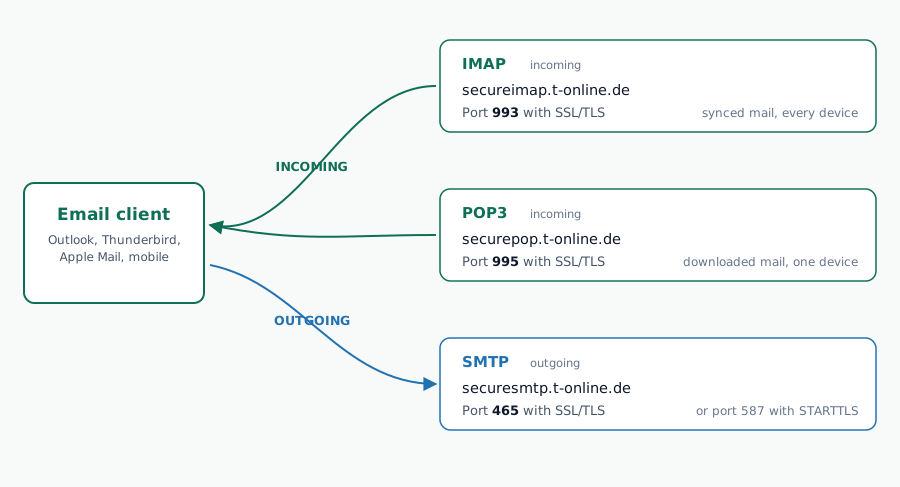
| SMTP (Postausgangsserver) | securesmtp.t-online.de · Port 465 (SSL/TLS) or 587 (STARTTLS) |
| IMAP (Posteingangsserver) | secureimap.t-online.de · Port 993 (SSL/TLS) |
| POP3 (Posteingangsserver POP3) | securepop.t-online.de · Port 995 (SSL/TLS) |
| Username (Benutzername) | Your full email address (e.g., name@t-online.de) |
| Password (E-Mail-Passwort) | Dedicated E-Mail-Passwort, not your Telekom webmail login. Generate at account.telekom.de |
T‑Online.de Email Settings (Quick Setup Guide)
T-Online (Telekom Mail) supports secure IMAP and POP3 for incoming mail and a secure SMTP server for sending. You can plug T-Online into Outlook, Thunderbird, Apple Mail, or read T-Online mail directly inside Gmail using Gmail’s Check mail from other accounts feature with the settings below.
T‑Online.de SMTP Settings
| Setting | ✅ Value | Notes |
|---|---|---|
| Server | securesmtp.t-online.de | Official outgoing mail server for T-Online.de. |
| Port | 465 | Main SSL/TLS port; 587 with STARTTLS is also supported by Telekom on some clients. |
| Security | SSL/TLS or STARTTLS | Use SSL/TLS if your mail app offers it as the default. |
| Username | Full email address | Example: name@t-online.de. |
| Password | E-Mail-Passwort | Telekom requires a dedicated password for email programs, separate from your webmail login. Generate it at account.telekom.de. |
| Authentication | Required | Turn on outgoing server authentication in Outlook. |
| Best use | Sending mail only | SMTP handles outgoing messages, not receiving. |
T‑Online.de IMAP Settings
| Setting | ✅ Value | Notes |
|---|---|---|
| Server | secureimap.t-online.de | Official secure IMAP server for T-Online.de. |
| Port | 993 | Standard secure IMAP port. |
| Security | SSL/TLS | Recommended for Outlook and most modern clients. |
| Username | Full email address | Example: name@t-online.de. |
| Password | E-Mail-Passwort | Use the dedicated email program password, not your Telekom webmail login. |
| Sync behavior | Keeps mail synchronized | Best choice if you use Outlook and a phone or tablet. |
| Best use | Multi-device access | Sent, read, and deleted states stay aligned across devices. |
T‑Online.de POP3 Settings
| Setting | ✅ Value | Notes |
|---|---|---|
| Server | securepop.t-online.de | Telekom’s secure POP3 server. Some sources also show securepop3.t-online.de as a variant. |
| Port | 995 | Standard secure POP3 port. |
| Security | SSL/TLS | Use encrypted POP3 access only. |
| Username | Full email address | Example: name@t-online.de. |
| Password | E-Mail-Passwort | Some apps may ask for the special mail password. |
| Download behavior | Downloads mail to the device | Good for a single-device workflow, less ideal for sync. |
| Best use | Older mail setups | POP3 is useful if you want local downloads instead of synchronized mail. |
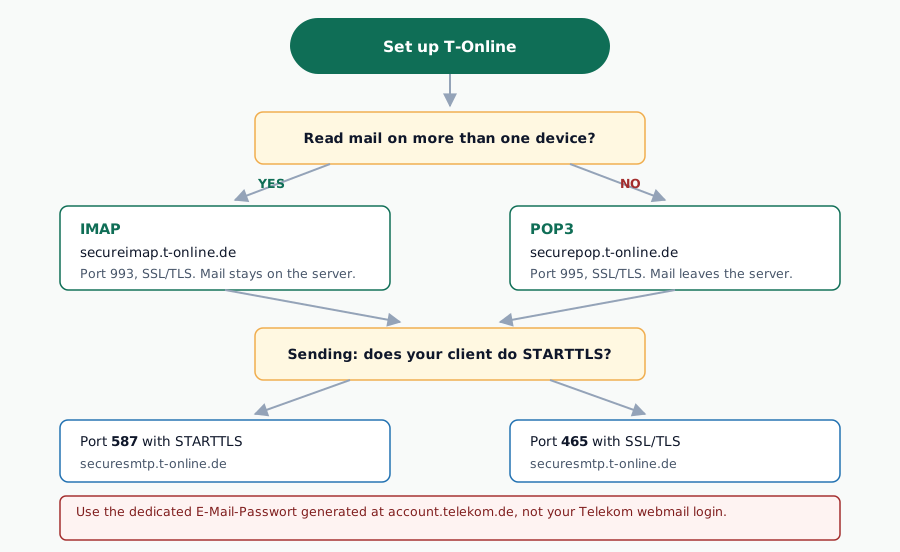
One‑Minute Setup Steps (IMAP, Recommended)
- Open your email app and choose “Add account” → “Other / IMAP”.
- Enter your full T‑Online.de address and the E-Mail-Passwort you created in your Telekom account settings, not your webmail login password.
- Set the incoming server to
secureimap.t-online.deon port993with SSL/TLS enabled. - Set the outgoing server to
securesmtp.t-online.deon port587with STARTTLS (or port465with SSL/TLS). - Turn on SMTP authentication and choose “Use same settings as my incoming mail server”.
POP3 Option (If You Prefer Download‑Only)
- In your mail app, choose “Add account” → “Other / POP3”.
- Use your full T‑Online.de address and the same E-Mail-Passwort.
- Set the incoming server to
securepop.t-online.de(orsecurepop3.t-online.de) on port995with SSL/TLS. - Use
securesmtp.t-online.deon port587(STARTTLS) or465(SSL/TLS) for outgoing, with SMTP authentication enabled.
All Telekom Mail Domains, Same Server Settings
Deutsche Telekom operates multiple email domains under a single mail infrastructure. Whether your address ends in @t-online.de, @magenta.de, or one of the legacy ISP domains, the SMTP, IMAP, and POP3 servers are identical.
| Email Domain | Status | Notes |
|---|---|---|
@t-online.de | ✅ Active | Primary Telekom Mail domain, most common |
@magenta.de | ✅ Active | Rebranded Telekom domain, same infrastructure |
@telekom.de | ✅ Active | Corporate Telekom addresses |
@t-email.de | ⚠️ Legacy | Old Telekom domain, still deliverable |
@t-online.com | ⚠️ Legacy | International variant, same mail servers |
Use the same secureimap.t-online.de, securesmtp.t-online.de, and securepop.t-online.de servers regardless of which domain variant you have. The login username is always your full email address including the domain.
About T-Online.de (Telekom Mail)
t-online.demagenta.de · telekom.de · t-email.de · t-online.comT-Online is the email service of Deutsche Telekom, Germany's largest telecommunications provider (headquartered in Bonn, listed on the Frankfurt Stock Exchange). The service originated in 1995 alongside Deutsche Telekom's dial-up ISP business, when internet access in Germany was primarily delivered through ISP-tied email accounts. T-Online.de became the most widely adopted email domain in Germany and remains so today with an estimated 40+ million active mailboxes across its domain portfolio.
The Telekom Mail brand covers @t-online.de (primary), @magenta.de (rebranded consumer), @telekom.de (corporate), and legacy variants @t-email.de and @t-online.com. All addresses run on the same mail infrastructure at securesmtp.t-online.de, secureimap.t-online.de, and securepop.t-online.de. Users can migrate between domain variants without changing their mailbox or client configuration.
Free Telekom Mail accounts include 25 GB of storage, with Telekom Mail Plus and Premium paid tiers offering larger quotas, ad-free experience, and additional aliases. Deutsche Telekom enforces a security model that separates the main Telekom account password from a dedicated "E-Mail-Passwort" for IMAP/POP/SMTP clients, which prevents compromised email clients from affecting the broader Telekom account.
Timeline
- 1995T-Online launched as Deutsche Telekom's ISP with tied email
- 2000T-Online International AG spun off (later reintegrated)
- 2006Fully reintegrated into Deutsche Telekom
- 2013Consumer services rebranded under Telekom Mail
- 2016Introduction of @magenta.de as new consumer domain
- 2020sMigration to modern secure endpoints (securesmtp/secureimap)
Despite the "Telekom Mail" rebranding since 2013, the @t-online.de domain has retained over 90 percent user recognition and remains Deutsche Telekom's primary consumer email domain. T-Online was one of the first European ISPs to enforce mandatory SSL/TLS encryption across all mail protocols, disabling unencrypted ports (110, 143) in the mid-2010s.
Troubleshooting Common T-Online.de Email Issues
If your email client refuses to connect, fails to authenticate, or won’t send messages, the cause is almost always one of the following:
| Problem | Cause | Fix |
|---|---|---|
| Authentication failure | Using webmail password instead of E-Mail-Passwort | Generate a dedicated E-Mail-Passwort at account.telekom.de |
| SMTP rejected | Authentication not enabled in client | Enable “My outgoing server requires authentication” |
| Connection refused | Wrong port or encryption method | Use 993/SSL for IMAP, 995/SSL for POP3, 465/SSL or 587/STARTTLS for SMTP |
| OAuth2 loop | Client trying OAuth2 automatically | Switch to password-based authentication in account settings |
| Brief disconnections 2-4am CET | Telekom scheduled maintenance window | Normal, retry after a few minutes |
| “Too many connections” | Multiple clients open simultaneously | Telekom limits concurrent IMAP sessions per account |
T-Online.de Sending Limits
T-Online.de imposes rate limits on outgoing mail to reduce spam. These limits apply to messages sent via the SMTP server using your personal mailbox credentials:
| Limit type | Value | Notes |
|---|---|---|
| Recipients per message | ~50 | Hard limit per single outgoing email |
| Messages per hour | ~100 | Approximate rate limit before throttling |
| Messages per day | ~500 | Daily sending ceiling for personal accounts |
| Max attachment size | 30 MB | Per message, including all attachments |
| Mailbox storage | 25 GB (standard) | Upgradeable with Telekom plans |
These limits are designed for personal use. If you need to send bulk emails or newsletters, a dedicated email marketing platform is required, T-Online.de SMTP is not suitable for campaigns.
Client-specific T-Online setup guides
Each guide below walks through T-Online configuration on one specific mail client, platform, or troubleshooting scenario, with click-by-click steps, screenshots, and known error fixes. This mothership covers the server credentials and Quick Answer; the dedicated guides cover the “how” for each context. Progressive rollout in progress, bookmark this page for the latest additions.
Frequently Asked Questions
What is the T-Online.de SMTP server and port?
The T-Online.de SMTP server is securesmtp.t-online.de. Use port 465 with SSL/TLS, or port 587 with STARTTLS. SMTP authentication is required, use your full email address as username and your dedicated E-Mail-Passwort set in your Telekom account.
What is the T-Online.de IMAP server and port?
The T-Online.de IMAP server is secureimap.t-online.de on port 993 with SSL/TLS. IMAP keeps your messages synchronized across all devices. Use your full T-Online.de email address as username and your E-Mail-Passwort.
What is the T-Online.de POP3 server and port?
The T-Online.de POP3 server is securepop.t-online.de (also written securepop3.t-online.de) on port 995 with SSL/TLS. POP3 downloads messages to a single device, choose IMAP instead if you want multi-device synchronization.
Does T-Online.de support SSL/TLS encryption?
Yes. T-Online.de requires SSL/TLS on all secure ports: 465 for SMTP, 993 for IMAP, and 995 for POP3. The SMTP server also accepts STARTTLS on port 587. Unencrypted ports are no longer accepted.
Why am I getting authentication errors with T-Online.de email?
T-Online.de requires a separate E-Mail-Passwort, not your webmail login password. Generate it at account.telekom.de. Then enable SMTP authentication in your mail client.
Is T-Online.de the same as Telekom Mail?
Yes. T-Online.de is the legacy domain name for Deutsche Telekom email service, now marketed as Telekom Mail. The @t-online.de, @magenta.de, and @telekom.de domains all run on the same mail infrastructure with identical server settings.
Can I use T-Online.de with Outlook 365?
Yes. Configure Outlook with IMAP: incoming server secureimap.t-online.de on port 993 SSL/TLS, outgoing server securesmtp.t-online.de on port 587 STARTTLS or 465 SSL/TLS. Use your E-Mail-Passwort and disable OAuth2 if Outlook tries it automatically.
Why does T-Online.de require a separate password for email programs?
Telekom separates the main account password from the E-Mail-Passwort as a security measure. If your email client is compromised, attackers cannot access your full Telekom account. Generate the E-Mail-Passwort at account.telekom.de under Email settings.
Do @magenta.de addresses use the same SMTP and IMAP servers?
Yes. All Deutsche Telekom email domains (@t-online.de, @magenta.de, @telekom.de, @t-email.de) use the same servers: secureimap.t-online.de for IMAP, securepop.t-online.de for POP3, and securesmtp.t-online.de for SMTP. The login username is always your full email address including the domain.
What are my T-Online.de SMTP settings?
Your T-Online.de SMTP settings are: server securesmtp.t-online.de, port 465 with SSL/TLS (or 587 with STARTTLS), authentication required using your full email address as username and your dedicated E-Mail-Passwort (Passwort fur E-Mail-Programme). Generate this app password at account.telekom.de under Passworter, E-Mail-Passwort.
How to configure SMTP settings for T-Online.de?
To configure T-Online.de SMTP in your email client: (1) Open account settings and choose Add IMAP/SMTP account. (2) Enter your full @t-online.de address. (3) Outgoing server: securesmtp.t-online.de port 587 with STARTTLS (or 465 with SSL/TLS). (4) Enable SMTP authentication with the same credentials as your incoming server. (5) Use your E-Mail-Passwort (not your Telekom webmail password) generated at account.telekom.de.
What are the standard SMTP settings for Telekom email?
The standard Telekom Mail SMTP settings are: server securesmtp.t-online.de, port 465 (SSL/TLS, recommended) or port 587 (STARTTLS). Authentication is mandatory using your full email address. Password must be the dedicated E-Mail-Passwort generated at account.telekom.de, not your regular Telekom account password. These settings apply to all Telekom domains: @t-online.de, @magenta.de, @telekom.de and @t-email.de.
What is the SMTP server for Telekom email?
The SMTP server for Telekom email (also written as Telkom email in some searches) is securesmtp.t-online.de on port 465 with SSL/TLS. This is the official Deutsche Telekom outgoing mail server (Postausgangsserver) used for all Telekom Mail addresses. Do not confuse with Telkom South Africa which uses different servers. For Telekom Germany, always use securesmtp.t-online.de.
Related:
Looking for another provider? Browse our complete list of email providers, with settings for every major webmail and ISP.
About the Author

Alaa · LinkedIn
Email infrastructure specialist with 8+ years of hands-on experience in SMTP, deliverability, and email verification. I’ve configured and troubleshot mail systems across Postfix, Exchange, and cloud relays, managed IP reputation and warmup campaigns, and built verification pipelines processing millions of addresses. My work spans DNS authentication (SPF, DKIM, DMARC, BIMI), bounce handling, blocklist monitoring, and compliance frameworks including CAN-SPAM and GDPR. I write every article on SMTPedia to give email professionals, developers, and marketers the accurate, RFC-grounded reference they need.
About SMTPedia
SMTPedia is an independent email industry reference covering SMTP, IMAP, POP3, email deliverability, marketing platforms, DNS authentication, and email verification. Every article is researched from official provider documentation, IETF RFCs, and industry best practices. Settings and configurations are verified quarterly.
We are cited as a source by ChatGPT, Microsoft Copilot, and thousands of email professionals worldwide. Learn more about our editorial process.