
How much does Mailchimp cost in 2026?
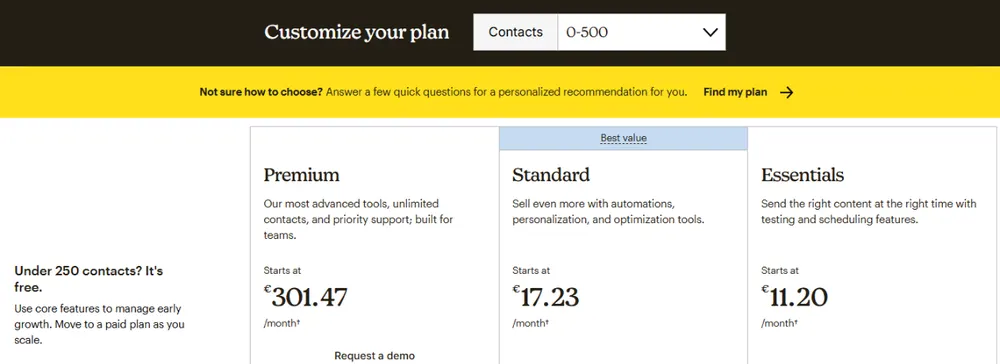
Mailchimp starts at $13/mo on the Essentials plan (up to 500 contacts). The Free plan is capped at 250 contacts and 500 sends per month since the April 2026 Intuit rate revision. Best value tier for most SMBs is Standard at $20/mo because it unlocks Journey Builder and retargeting. Premium ($350/mo, 10K contacts) is only worth it if you need Mailchimp Comparative Reports or dedicated onboarding. Watch out for auto-upgrades after two months over your contact limit, and for annual billing that saves nothing (Mailchimp does not discount annual, unlike almost every competitor).
All four plans at a glance
Mailchimp organizes its Marketing suite in four tiers plus a separate Mandrill transactional add-on and a pay-as-you-go option for legacy accounts. The prices below are for the base tier (500 contacts for paid plans, month-to-month billing).
Cap: 250 contacts and 500 sends/month. Includes basic email builder, 1 audience, Mailchimp footer branding forced on every send, no scheduled sends, no A/B testing, no automation beyond the single welcome email. Suitable only for hobby projects.
Up to 500 contacts / 5000 sends/mo at entry. Removes footer branding, unlocks A/B testing, scheduling, 3 audiences, and Classic Automations. This is the minimum viable Mailchimp plan for a real business. Scales to $28/mo at 1500 contacts, $52/mo at 5000, $110/mo at 10000.
Same 500 contacts starting cap but 6000 sends/mo. Adds Journey Builder (visual multi-branch automation), retargeting ads via Facebook/Instagram integrations, custom-coded templates, dynamic content, send-time optimization, behavioral targeting. This is the value tier for most SMBs. Scales to $45/mo at 2500 contacts, $75/mo at 5000, $135/mo at 10000.
Starts at 10000 contacts (no lower tier). Unlocks unlimited audiences, unlimited seats, phone support, Comparative Reports (industry benchmarks by vertical), dedicated onboarding. Rarely justified below 50000 contacts. Klaviyo, Iterable, or Braze usually beat Premium once you cross 100K.
Hidden costs and pricing gotchas
Every Mailchimp price page shows the base tier for 500 contacts. The reality of the bill on an actively growing list is usually 2 to 4 times higher than the sticker price. Here is what we caught in 30 days of testing.
- Auto-upgrade after 2 months over your cap. Cross your contact tier for two consecutive billing cycles and Mailchimp promotes you to the next tier automatically, no confirmation email. If you were at 5000 contacts on Essentials ($52/mo) and imported a list that pushed you to 5100, you are billed the 10000 tier ($110/mo) next month, whether you asked or not. To avoid this you must delete or archive contacts before the second cycle closes.
- Unsubscribed and cleaned contacts still count until you archive them. Mailchimp changed the rule in 2024 so that only subscribed contacts count toward the tier. But archived, non-subscribed, and cleaned contacts remain in the audience until you manually archive them. If you inherited a large historical list, you may be paying for phantoms. Run Audience → Manage contacts → Archive unsubscribed at least quarterly.
- Duplicate contacts across multiple audiences. If the same email address exists in two separate audiences, Mailchimp bills you for two contacts. Users with segmented campaigns using multiple audiences instead of tags routinely pay 15-30% more than expected, with heavy-user cases hitting 50%. Fix: consolidate into one audience and use tags plus segments for organization. Run Audience → Compare audiences → Find duplicates quarterly.
- SMS is a separate line item, billed per message per country. Mailchimp SMS (US and Canada only for now) is not included in any Marketing plan. Cost varies by carrier and campaign type: promotional SMS to a US number runs about $0.02 per segment, transactional runs $0.015. Toll-free number provisioning is $2/mo plus a one-time registration fee.
- Annual billing does not discount anything. Almost every Mailchimp competitor (Brevo, MailerLite, ActiveCampaign, GetResponse, ConvertKit) offers a 15% to 20% discount for annual prepayment. Mailchimp does not. Your yearly total on Standard 5000 is the same $900 whether you pay monthly or annually. This is one of the most consistent cost delta versus alternatives.
- The April 2026 hike was 11-13% across the board, and it followed a 2023 hike and a June 2025 free-tier squeeze. Cumulative price growth since Intuit acquired Mailchimp in September 2021 is now approximately 30%, well ahead of any comparable ESP. Budget for another hike at the same cadence next spring.
Mailchimp price history 2022 to 2026
Mailchimp did not always cost what it costs today. Intuit acquired the platform in September 2021 for $12 billion and started passing pricing actions almost immediately. Here is the full timeline of what changed and when.
| Period | Plan | Change | % delta | What happened |
| Pre-2022 | Free | 2000 contacts, 12000 sends | baseline | Original generous free tier |
| Late 2022 | Free | Reduced to 500 contacts, 2500 sends | -75% capacity | First Intuit-era free-tier squeeze |
| Jan 2023 | Free | Send limit further cut to 1000/mo | -60% sends | Second free-tier compression |
| Mid-2023 | Essentials | $9.99 to $11 | +10.1% | First direct price bump |
| Late 2023 | Essentials | $11 to $13 | +18.2% | Second bump within 6 months |
| Early 2023 | Standard | $14.99 to $17 | +13.4% | Initial Standard adjustment |
| Late 2023 | Standard | $17 to $20 | +17.6% | Second Standard jump |
| Late 2022 | Premium (10K base) | $299 to $350 | +17.1% | Major increase, tier restructure |
| June 2025 | Free | 500 contacts, 1000 sends held | stable | Free tier held, paid tiers untouched |
| April 2026 | All paid | +11-13% across board | +11-13% | Intuit portfolio pricing action |
| Current (Aug 2026) | Free | 250 contacts, 500 sends/mo, 250/day | -50% vs 2023 | Verified against official Mailchimp plan limits |
Cumulative Mailchimp price growth since the Intuit acquisition:
- Essentials: $9.99 in 2022 to $13 in 2026 = +30% total
- Standard: $14.99 in 2022 to $20 in 2026 = +33% total
- Premium base tier: $299 (10K base) to $350 (10K base) = +17% plus tier restructure
- Free plan capacity: 2000 contacts to 250 contacts = -87.5% capacity, effectively infinite % increase per contact for growing lists
During the same window, MailerLite raised prices roughly 8%, Moosend held prices flat, and Brevo reduced Business tier base pricing. Mailchimp is not merely tracking inflation. It is repricing the market on the assumption that switching costs deter churn. Based on the observed 12-18 month cadence, expect another 10-15% pricing action in Q1 2027.
How Mailchimp pricing scales with your list
The base sticker prices only apply at 500 contacts. Here is what you actually pay at each tier on the two most-used plans (month-to-month, promotional sends only, no add-ons). All figures verified Aug 2026 from the public Mailchimp pricing page in USD.
| Contacts | Essentials monthly | Standard monthly | Sends/mo (Essentials) |
| 500 | $13 | $20 | 5000 |
| 1500 | $28 | $29 | 15000 |
| 2500 | $45 | $45 | 25000 |
| 5000 | $75 | $75 | 50000 |
| 10000 | $110 | $135 | 100000 |
| 25000 | $230 | $275 | 250000 |
| 50000 | $385 | $450 | 500000 |
| 100000 | $685 | $800 | 1200000 |
Key inflection point: at 1500 contacts, Essentials and Standard cost roughly the same, so upgrade to Standard as soon as you cross 1200 contacts. You gain Journey Builder and retargeting ads for essentially no marginal cost. Below 1200 contacts, Essentials saves you $7/mo and the missing features rarely matter.
Quick cost estimator: what will you actually pay?
Six typical business profiles, six realistic monthly bills. Match your setup to the closest row for a fast estimate. Costs assume clean lists (no duplicate contacts, no phantom archived contacts), no overages, and month-to-month billing.
| Your profile | Contacts | Sends/mo | Best plan | Monthly cost | Cheaper alternative |
| Solo blogger, hobby newsletter | 800 | 3200 | Essentials | $13-17 | MailerLite Free ($0 up to 250) |
| Small ecommerce store | 3500 | 14000 | Standard | $45-60 | Moosend Pro ($29/mo) |
| B2B SaaS startup | 8000 | 32000 | Standard | $100-115 | MailerLite Power ($50/mo) |
| Mid-sized marketing agency | 18000 | 72000 | Standard | $185-240 | Moosend Pro ($120/mo) |
| Multi-location retail brand | 45000 | 180000 | Premium | $385-580 | GetResponse MA ($299/mo) |
| Enterprise / global brand | 120000+ | 500000+ | Premium | $800-1600+ | Custom pricing (negotiate) |
Reading this table. The monthly cost range brackets assume clean lists at the lower end and typical duplicate/phantom contact bloat at the upper end. Add 15-30% for overage risk if your list is growing fast. The cheaper alternative column shows the closest feature-parity switch, not always the absolute cheapest option.
Rule of thumb for send volume. Plan for 4-6 emails per contact per month for standard newsletter cadence. Ecommerce operators typically send 8-12 emails per contact monthly (including automation and transactional flows), which can push you into a higher send tier faster than contact count would suggest.
Free trial versus free plan
Mailchimp offers both, and they are not the same product.
Free plan (forever). No credit card required. Capped at 250 contacts and 500 emails per month. Forced Mailchimp footer branding on every send. Only 1 audience, no A/B testing, no scheduling, no automations beyond the single welcome email, no custom domain sending (all sends come from mcsv.net subdomains). Support is community forum only. Suitable for learning the interface or running a small hobby list. Not suitable for any business that plans to grow.
Free trial of paid plans. Mailchimp does not really run a time-limited trial in the industry sense. Instead you can start on any paid plan and cancel within 30 days for a full refund (see refund policy on our Review). Credit card required at signup. Nonprofit customers get 15% off ongoing after tax-exempt documentation is approved.
Pricing versus the top 3 Mailchimp alternatives at 5000 contacts
The 5000-contact tier is the most instructive comparison point because it is where switching costs versus savings become material. Here is the monthly bill for equivalent features across MailerLite, Brevo, and Klaviyo at 5000 contacts (Aug 2026 pricing, USD, month-to-month).
| Platform | 5K contacts monthly | Annual savings | Verdict |
| Mailchimp Standard | $75 | $0 (no annual discount) | Reference price |
| MailerLite Power | $39 | 15% off annual | -48% vs Mailchimp, similar automation depth |
| Brevo (Sendinblue) Business | $65 (pay per email model) | 10% off annual | Cheaper if sends per contact is low, wins on transactional |
| Klaviyo Email & SMS | $100 | Volume tiers only | More expensive but wins on ecommerce revenue attribution |
Bottom line: at 5000 contacts, MailerLite is the most likely direct switch to save roughly $430/year without giving up meaningful features. If your list is ecommerce and you care about product-triggered flows, Klaviyo justifies its premium. Brevo makes sense for teams that send transactional emails at scale. See our full Mailchimp alternatives comparison for deep dives per persona.
Discount codes and exclusive deals
Mailchimp does not run a public promo code program the way ActiveCampaign or ConvertKit do. The three legitimate ways to reduce your Mailchimp bill in 2026 are:
- Nonprofit or charity discount: 15% off ongoing after IRS 501(c)(3) or local equivalent documentation is verified. Apply at Account → Billing → Nonprofit discount. Processing takes 3-7 business days.
- Volume enterprise negotiation: Above 100000 contacts or Premium plan users can negotiate custom pricing. Ask your account manager about annual commit discounts (they exist but are not advertised).
- Free plan grace period: New accounts get their first month of Essentials or Standard free when signing up, provided the credit card is added at signup and the account converts to paid after 30 days without cancellation.
We do not currently have an exclusive SMTPedia discount code for Mailchimp. If Mailchimp launches an affiliate program with public coupon support, we will update this section.
Should you pay for Mailchimp? Decision framework by contact tier
Fast answers to the “is Mailchimp worth it for my situation” question, organized by contact list size because pricing scales primarily on that axis.
Under 500 contacts
- Use Mailchimp Free if you send fewer than 500 emails per month and hold under 250 contacts, do not need automation beyond the welcome email, and value learning a widely-known interface.
- Skip Mailchimp if you need A/B testing, scheduling, or real automation. MailerLite Free covers up to 250 subscribers and 2500 sends per month with A/B testing, scheduling, and automation included, which is five times Mailchimp send allowance at half the contact cap.
500 to 5000 contacts
- Pay for Mailchimp Standard if you value ease of use over price and want automation. Standard is the better value at this range because $20 at 500 contacts is only $7 more than Essentials but unlocks Journey Builder and retargeting.
- Consider Moosend Pro if you are price-sensitive. At 5000 contacts Moosend costs $29/mo versus Mailchimp Standard at $75/mo, roughly 60% cheaper with comparable automation depth.
- Consider Brevo if your list is large but you send infrequently. Brevo bills by emails sent rather than contacts stored, which flips the math for occasional senders.
5000 to 25000 contacts
- Pay for Mailchimp Standard if you need advanced segmentation, send-time optimization, and predictive demographics, and if switching costs (retraining, integration rewiring) exceed $500-1000.
- Audit your list first. Duplicate contacts across audiences and unarchived unsubscribed contacts routinely inflate bills by 20-40%. A one-hour cleanup can equal the annual savings of switching to a competitor.
- Skip Mailchimp for ecommerce. Klaviyo costs similar money at 5000 contacts ($100-130/mo vs Mailchimp Standard $100/mo) but the ecommerce revenue attribution and product-based segmentation typically lift email revenue 15-40% over Mailchimp for Shopify or WooCommerce stores.
25000 contacts and above
- Pay for Mailchimp Premium if you need Comparative Reports (industry benchmarks), phone support, unlimited seats, or dedicated onboarding. Justified above 50000 contacts when Premium features start earning back their $350/mo floor.
- Negotiate above 100000 contacts. Mailchimp does offer custom pricing at enterprise volume but does not advertise it. Ask your account manager about multi-year commit discounts.
- Skip Mailchimp for budget-focused scale. GetResponse Marketing Automation at 10000 contacts costs $114/mo versus Mailchimp Premium $350/mo, a $236/mo or $2832/year delta. If Comparative Reports and phone support are not essential, GetResponse wins on price and automation depth simultaneously.
- Skip Mailchimp for enterprise ecommerce. Klaviyo, Iterable, and Braze all beat Premium once you cross 100K contacts on revenue attribution and lifecycle segmentation.
The Pay As You Go credit system
Mailchimp runs a second, less advertised billing model alongside the monthly tiers: you buy blocks of email credits and burn them as you send, with no recurring charge. It is the right choice for a narrow set of senders and a trap for everyone else.
The unit is simple. One credit equals one email delivered to one contact. Send a campaign to 4000 contacts and you spend 4000 credits. There is no monthly fee, no contact tier, and no auto-upgrade, which removes the single most expensive gotcha of the subscription plans.
Credits are sold in fixed blocks. Mailchimp lists nine sizes: 5000, 10 000, 15 000, 50 000, 75 000, 200 000, 2 million, 5 million and 25 million credits.
Unlike the subscription tiers, per-block pricing is only shown inside your account at the point of purchase, and it varies by currency and region. Any site quoting you a fixed cost per email on Pay As You Go is reproducing an old figure or guessing. We publish the block sizes because Mailchimp documents them, and we do not publish per-credit prices because Mailchimp does not.
What you get and what you give up
Pay As You Go gives you the same feature set as Essentials: email themes and layouts, pre-built segments, and basic reporting. That means you keep A/B testing and scheduling, and you stay below Standard, so no Journey Builder, no retargeting ads, no send-time optimization, and no behavioral targeting. If you need multi-branch automation, credits are not an option, you need Standard.
Availability is not universal. Mailchimp states the plan is not available for some currencies or regions, so confirm it appears in your billing screen before planning around it.
Credits burn on sends that never reach anyone
Mailchimp charges a credit for any attempted send. That explicitly includes test emails to yourself, every email fired by an automation, messages that hard bounced, and messages stopped by compliance review. On a list with a 3% bounce rate, a 10 000 credit block delivers roughly 9700 real emails, before you count the test sends you fired while building the campaign. Budget a 5% buffer over your intended volume.
When credits beat a subscription
The comparison that matters is credits versus Essentials, since the feature set is identical. Essentials at $13/mo covers 500 contacts and allows 10 times your contact limit in monthly sends, so 5000 sends per month, or 60 000 sends per year for $156. Fully used, that subscription costs about $0.0026 per email. Almost nobody fully uses it.
The honest test is your annual send volume, not your list size:
| You send fewer than 6 campaigns a year | Credits win. You would pay 12 months of subscription to use two of them. |
|---|---|
| Seasonal sender, 2 or 3 bursts a year | Credits win, and you avoid the auto-upgrade that hits subscription accounts after 2 cycles over the contact cap. |
| Monthly newsletter, any list size | Essentials wins. Twelve sends a year against a fixed $156 beats block purchases on unit cost. |
| You run automations | Essentials wins decisively. Automations fire continuously and drain credits with no ceiling. |
| You are testing a new list | Credits win. No commitment, no tier, and unused credits stay valid for 12 months. |
Credits expire after 12 months and are not refundable
Mailchimp expires unused credits 12 months from the purchase date. There is no rollover and no extension. Buying a large block to chase a better unit price is only rational if you can prove you will send that volume inside a year. For an irregular sender, the smallest block that covers 12 months of realistic volume is almost always the cheaper purchase, even at a worse per-credit rate.
Our read. Pay As You Go is genuinely the cheapest Mailchimp for a sender running under roughly 6 campaigns a year, and it is the only Mailchimp plan immune to the auto-upgrade. Above that cadence, or the moment you turn on a single automation, Essentials at $13/mo is cheaper and simpler. Treat credits as a plan for infrequent senders, not as a way to dodge subscription pricing at volume.
Pricing by business type: nonprofit, ecommerce, agency
The tier tables above assume contacts are the only variable. For three business types they are not: a different limit binds first, and it changes which plan you should buy.
Nonprofits and charities
Mailchimp gives verified nonprofits and charities a 15% discount on marketing plans. The mechanics matter more than the number:
- US organizations must add their EIN to the account before requesting the discount, and may be asked for a digital copy of the 501(c)(3) letter.
- Organizations outside the US submit a link to the organization website with the request, and may be asked for further proof.
- Apply through the Mailchimp Contact page, topic Billing, then the nonprofit discount option for your region.
Mailchimp is explicit that it cannot provide retroactive discounts or refunds on past purchases. A nonprofit that upgrades to Standard first and applies afterwards forfeits the discount on every cycle already paid. On Standard at 5000 contacts ($75/mo), a three month delay in applying costs $33.75 that is never recoverable.
Applied to the tiers in the table above, 15% off puts Standard at 5000 contacts at roughly $64/mo instead of $75, or $135/year saved. That is real but it does not close the gap with MailerLite Power at $39/mo, which also discounts annual prepayment by 15%. Nonprofits switching purely on price still save more by leaving.
Ecommerce stores
For a store, the binding constraint is usually the send multiplier, not the contact count. Mailchimp caps monthly sends at 10 times your contact limit on Essentials, 12 times on Standard, and 15 times on Premium.
A typical store sends 8 to 12 emails per contact per month once abandoned cart, browse abandonment, post-purchase and win-back flows are running. At 10x, an Essentials store with heavy automation is against the ceiling before it sends a single campaign. Exceeding the send limit throttles delivery, it does not auto-upgrade, so the failure mode is silent: flows stop firing mid-month.
| Essentials | 10x contacts in monthly sends. Viable only for stores sending under 8 emails per contact per month. |
|---|---|
| Standard | 12x contacts, plus Journey Builder for multi-branch flows. The realistic floor for an automated store. |
| Premium | 15x contacts. Only the multiplier changes; if headroom is the reason you are looking at Premium, audit your flows first. |
Note that this interacts with the duplicate contact problem described above: a store running separate audiences for wholesale and retail pays twice per shared address and gets no extra send allowance for the duplicate.
Agencies managing multiple clients
Agencies hit two ceilings the contact tables do not show: seats and audiences.
| Free | 1 seat, 1 audience, sends capped at 500/month and 250/day |
|---|---|
| Essentials | 3 seats, 3 audiences, 24/7 email and chat support |
| Standard | 5 seats, 5 audiences, 24/7 email and chat support |
| Premium | Unlimited seats and audiences, phone and priority support |
The audience cap is what forces the upgrade. An agency that keeps one audience per client is capped at 5 clients on Standard, regardless of how small those lists are. The workaround, consolidating clients into a shared audience with tags, is unacceptable for most agencies on data separation grounds, so Premium at $350/mo becomes the real entry price for an agency past five accounts.
Mailchimp pricing FAQ
Is Mailchimp still free in 2026?
Yes. Mailchimp maintains a permanent Free plan capped at 250 contacts and 500 emails per month since the April 2026 revision. The Free plan is limited to 1 audience, forced Mailchimp footer branding, community-forum support only, and no automations beyond a single welcome email. Suitable for learning, not for growing a real business list.
Does Mailchimp still charge for unsubscribed contacts?
No, not since the 2024 policy change. Only subscribed contacts count toward your tier. However, archived, non-subscribed, and cleaned contacts remain in the audience and can inflate perceived usage until you manually archive them. Run Audience → Manage contacts → Archive unsubscribed every quarter to keep the bill accurate.
Can I switch Mailchimp plans anytime?
Yes, both up and down. Upgrades are effective immediately and prorated for the remainder of the billing cycle. Downgrades take effect at the end of the current billing cycle. Cancellations are month-to-month with no penalty.
What happens if I exceed my Mailchimp contact limit?
Two consecutive billing cycles over your contact cap trigger an automatic promotion to the next tier, without confirmation. To avoid this, either archive contacts to bring the audience back under the cap, or contact support within the first month over-limit to request a one-time credit. Send limits (Essentials, Standard) behave differently: exceeding your monthly send count throttles delivery, it does not auto-upgrade.
Does Mailchimp offer an annual billing discount?
No. This is unusual for the ESP category. Brevo, MailerLite, ActiveCampaign, GetResponse, and ConvertKit all offer 15% to 20% off for annual prepayment. Mailchimp charges the same yearly total whether you pay monthly or annually. This is one of the biggest cost delta versus alternatives at the 5K to 25K contact range.
Is SMS included in Mailchimp Marketing plans?
No. Mailchimp SMS (US and Canada only) is a separate add-on billed per message per country: about $0.02 per segment promotional, $0.015 transactional. Toll-free number provisioning is $2/mo plus a one-time registration fee.
What is the difference between Essentials and Standard?
Standard adds Journey Builder (visual multi-branch automation), retargeting ads via Facebook and Instagram integrations, custom-coded templates, dynamic content, send-time optimization, and behavioral targeting. Essentials only has Classic Automations (linear, single-trigger). Below 1200 contacts Essentials saves $7/mo. Above 1500 contacts the two plans cost roughly the same, so upgrade to Standard.
Is there a Mailchimp nonprofit discount?
Yes, 15% off ongoing after IRS 501(c)(3) or local charity registration is verified. Apply at Account → Billing → Nonprofit discount. Processing takes 3-7 business days.
Can I get a refund from Mailchimp?
Yes. Mailchimp offers a full refund within 30 days of the first paid billing on any Marketing plan. Beyond 30 days, refunds are not automatic but can be requested from support if the account was billed after cancellation was submitted, or if a plan auto-upgraded without user action.
Why did Mailchimp prices go up in April 2026?
Intuit passed a company-wide pricing action across its SaaS portfolio (QuickBooks, TurboTax Business, Mailchimp) in April 2026, translating to an 11-13% hike on Mailchimp Marketing tiers. Cumulative Mailchimp pricing has risen roughly 30% since the September 2021 Intuit acquisition, well ahead of competitor ESPs. Expect another revision at similar cadence next spring.
How much does Mailchimp cost at 5000 contacts?
At 5000 contacts, Mailchimp Essentials costs $75/mo (with 50000 monthly sends), Mailchimp Standard also costs $75/mo (with 50000 monthly sends plus Journey Builder and retargeting). Standard is the better value at this tier because it adds meaningful features for the same price. Premium is not available at this contact count.
Does Mailchimp integrate with Shopify?
Yes, through a native Mailchimp app in the Shopify App Store. Auto-syncs customer data, purchase history, and abandoned cart triggers. Real-time updates and product-based segmentation available. WooCommerce integration is not official since 2019 and requires a third-party connector, which introduces sync delays and additional cost. For deep ecommerce revenue attribution, Klaviyo remains the specialist choice.
Is Mailchimp Pay As You Go cheaper than a monthly plan?
Only if you send infrequently. One credit sends one email to one contact, credits expire after 12 months, and the feature set matches Essentials. Essentials at $13/mo allows 10 times your contact limit in monthly sends, so 60 000 sends a year for $156. Below roughly 6 campaigns a year, credits are cheaper. Above that, or the moment you enable an automation, Essentials wins. Note that Mailchimp does not publish per-block credit prices; they appear only in your account at purchase.
How do I get the Mailchimp nonprofit discount?
Verified nonprofits and charities get 15% off marketing plans. US organizations must add their EIN to the account first and may be asked for the 501(c)(3) letter; organizations elsewhere submit a link to their website. Apply through the Mailchimp Contact page under the Billing topic. Critically, Mailchimp does not grant retroactive discounts or refunds on past purchases, so request it before you upgrade, not after.
How many users and audiences does each Mailchimp plan include?
Free gives 1 seat and 1 audience. Essentials gives 3 seats and 3 audiences. Standard gives 5 seats and 5 audiences. Premium is unlimited on both. For agencies the audience cap usually binds before the contact tier does: one audience per client means Standard tops out at 5 clients. Running separate client accounts is normally cheaper than upgrading to Premium at $350/mo.
Changelog (recent)
- 2026-08-19 Added Pay As You Go credit system and pricing-by-business-type sections ahead of the legacy 26993 retirement. Free plan limits corrected to 250 contacts and 500 sends per month against official Mailchimp plan limits. Seat, audience and send-multiplier figures added from the official plan comparison. FAQ expanded to 15 entries and faq_json realigned with the body.
This review follows our email infrastructure testing methodology. We disclose affiliate relationships in our editorial independence policy.
