The Spectrum email settings that fail most often are not the ports. They are the hostnames. Charter publishes its mail server names under a heading that reads Server Settings Based on Domain, and the name you need depends on what comes after the at sign in your address, not on your device, your plan or your mail app. A charter.net mailbox and an rr.com mailbox do not use the same server. Almost every third party guide flattens the two into one, and several invent a third that Charter does not publish anywhere.
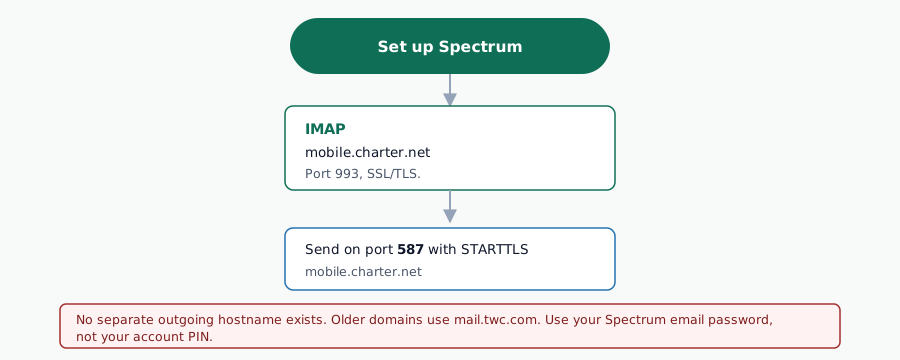
Spectrum publishes a single hostname per domain family, and that same hostname serves as both the incoming and the outgoing server. If your address ends in charter.net or spectrum.net, that hostname is mobile.charter.net. If it ends in roadrunner.com, adelphia.net, brighthouse.com or one of the regional rr.com domains, it is mail.twc.com. There is no separate outgoing name, which is why an smtp.charter.net or an smtp.twc.com copied from a third party guide never connects.
Key Takeaways
- The server name is keyed to your domain:
mobile.charter.netfor charter.net and spectrum.net,mail.twc.comfor the legacy Time Warner Cable, Bright House and rr.com domains. - The same hostname is entered twice, once as the incoming server and once as the outgoing server. Spectrum does not publish a dedicated SMTP hostname.
- Incoming port 993 with SSL. Outgoing port 587 with authentication required. Those are the two values Spectrum publishes on its own settings page.
- The username is your complete email address, including everything after the at sign. A username without the domain is rejected.
- Spectrum does not publish a POP3 row in its settings block. Port 995 is the standard encrypted POP3 port and is what Spectrum moderators point customers to, but it is a protocol fact rather than a documented Spectrum value.
Spectrum Email Settings at a Glance
These are the values Charter publishes for Spectrum mail, read in August 2026. Fill the hostname in from the domain table in the next section, then use the same values in both directions.
| Setting | Value | Notes |
|---|---|---|
| Incoming server | mobile.charter.net or mail.twc.com | Chosen by your domain, see below |
| Incoming port | 993 | IMAP over SSL |
| Outgoing server | The same hostname as incoming | No separate SMTP name exists |
| Outgoing port | 587 | Submission, authentication required |
| Username | Your full email address | Including the part after the at sign |
| Password | Your Spectrum email password | Not your Spectrum.net account PIN |
| Requires authentication | Yes, in both directions | Checked in every client |
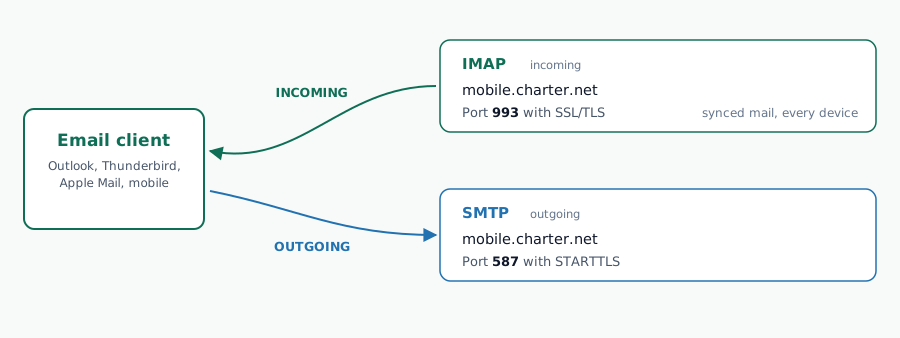
If those two port numbers look unfamiliar, the reasoning behind them is standard rather than Spectrum specific: 993 and 587 are the ports the protocols themselves reserve for encrypted access and authenticated submission, as set out in our reference on how POP3, IMAP and SMTP ports are assigned.
Server Settings Based on Domain
This is the section that decides whether your setup works. Charter acquired Time Warner Cable and Bright House and kept both mail platforms running, so a Spectrum customer today may hold an address on either one. The company documents the split rather than hiding it, on both its email server settings page and its email troubleshooting page.
| If your address ends in | Incoming and outgoing server |
|---|---|
| charter.net, spectrum.net | mobile.charter.net |
| roadrunner.com, adelphia.net, brighthouse.com and the regional rr.com domains such as bak.rr.com, bham.rr.com, cfl.rr.com, indy.rr.com, mi.rr.com, nycap.rr.com and tampabay.rr.com | mail.twc.com |
Some customers hold a pair of domains on the same mailbox, such as roadrunner.com with adelphia.net, or mi.rr.com with twmi.rr.com. In that case the mailbox is one and the same, and the address you sign in with is the one the account was created under. The legacy side of this estate has enough quirks of its own that it gets a separate page: see what an rr.com address actually connects to in 2026 for the full domain list and the client by client walkthrough.
The Roadrunner brand itself was retired, which is why nothing on spectrum.net carries the name any more. The mailboxes were not retired with it. That pattern, a brand disappearing while the mail platform keeps running underneath, is common enough among American ISPs that we track it in our survey of legacy email providers still accepting connections.
Spectrum IMAP Settings: Port and Server Details
IMAP is the protocol Spectrum documents and the one to choose unless you have a specific reason not to. It leaves messages on the server, so the same mailbox reads identically on a phone, a laptop and the Spectrum webmail interface.
- Server:
mobile.charter.netfor charter.net and spectrum.net addresses,mail.twc.comfor the legacy domains. - Port 993 with SSL enabled. The unencrypted alternative, port 143, should not be used against a residential ISP mailbox.
- Authentication required, with the full email address as the username.
Clients differ in what they call these fields, and a client that offers to detect the settings for you will usually get the hostname wrong here because the domain split defeats autodiscovery. Entering them by hand is the reliable route: our IMAP configuration guide covers the field names each major client uses, and the SSL and TLS setup reference explains the difference between the SSL option and the STARTTLS option that some clients present alongside it.
Spectrum POP3 Settings: What Is and Is Not Published
POP3 still works on Spectrum mailboxes and long standing rr.com accounts are frequently still configured that way. What matters for an accurate page is the distinction between what Spectrum documents and what the wider web asserts on its behalf.
Spectrum’s published settings block contains an incoming port and an outgoing port. It does not contain a POP3 row. The port 995 that every guide quotes is the standard encrypted POP3 port, and Spectrum moderators do tell customers on the community forum to use it, but it is not a value Charter publishes in its own documentation. We report it as what it is: a protocol default that works, not a documented Spectrum setting.
In practice, a POP3 client on a Spectrum mailbox uses the same hostname as everything else, port 995, SSL enabled, full address as username. The trade off is the one POP3 always carries: mail downloaded to one device stops being visible from the others unless the client is told to leave copies on the server. Our POP3 configuration guide covers that setting and the mailbox size consequences of getting it wrong.
Spectrum SMTP Settings: Outgoing Mail
The outgoing side is where the bad copies of these settings do the most damage, because a wrong outgoing server produces a silent queue rather than an obvious error at setup time.
Outgoing server: the same hostname you entered as the incoming server. Port 587. Authentication required, using the full email address and the mailbox password.
An earlier version of this page told readers to use port 587 for IMAP accounts and port 25 for POP3 accounts. That was wrong and has been removed. The outgoing port has nothing to do with which protocol collects your mail: submission is 587 in both cases. Port 25 is the port mail servers use to relay to each other, it is not a client submission port, and most residential networks block outbound 25 anyway.
If your client offers a choice of encryption on the outgoing server, 587 expects STARTTLS, which upgrades a plain connection to an encrypted one after the greeting. A client configured for implicit SSL on 587 will usually fail with a handshake error rather than an authentication error, which is a useful signal when reading the log. The wider picture of which port pairs with which encryption mode is in our SMTP setup guide.
Hostnames That Do Not Exist
These four names circulate widely, appear in third party guides and in automated search summaries, and are not published by Charter on any Spectrum support page. If one of them is in your client, that is the fault.
| Name in circulation | What to use instead |
|---|---|
imap.charter.net | mobile.charter.net |
pop.charter.net | mobile.charter.net |
smtp.charter.net | mobile.charter.net, the same name as incoming |
smtp.twc.com and mobile-smtp.roadrunner.com | mail.twc.com, the same name as incoming |
The pattern behind all four is the same assumption: that a mail provider always exposes a protocol prefixed hostname per service. Many do. Spectrum does not, and neither do several other American ISPs, which is why copying a naming convention across providers is a poor strategy. Compare the shapes at Comcast Xfinity, AT&T and Cox: no two use the same convention.
When Spectrum Mail Stops Sending or Receiving
Three failure shapes account for most of what turns up on the Spectrum community forum, and they are distinguishable by the error text alone.
- Authentication fails on a mailbox that works in webmail. Usually the username was entered without the domain part, or the client is sending the Spectrum.net account password instead of the mailbox password.
- Receiving works, sending queues. The outgoing server is set to a name that does not resolve, or authentication was left unchecked on the outgoing server only. Both are silent at setup and only surface on the first send.
- A certificate or encryption error. The client is set to implicit SSL on 587, or to an obsolete TLS version. A server refusing to continue without an encrypted channel produces a distinctive reply, which we break down in 550 must issue a STARTTLS command first.
When the client reports a numeric reply rather than a plain sentence, the number tells you whether the problem is your configuration or the server’s state. Our SMTP error code reference maps each one to its cause.
IMAP, POP3 and SMTP Integration into Gmail

Configure Gmail with external IMAP/POP3/SMTP to send/receive emails from your custom domain through Gmail’s interface. Perfect for professionals managing multiple accounts in one place.
- Google Account → Security → App passwords (2-Step Verification must be enabled).
- Generate App Password for “Mail” → copy 16-character password.
- Gmail → Settings → See all settings → Forwarding and POP/IMAP.
- Enable IMAP → Save Changes.
- Incoming (IMAP):
[IMAP SERVER]:993 SSL| Outgoing (SMTP):[SMTP SERVER]:587 STARTTLS. - Use your full email + App Password (not regular password) for authentication.
Gmail Result: Send/receive custom domain email directly in Gmail interface with full search/folder integration.
WordPress SMTP Plugin Configuration (WP Mail SMTP + MailPoet)


Configure SMTP in WordPress to fix email delivery issues and prevent spam folder placement. WP Mail SMTP and MailPoet ensure reliable transactional emails, contact forms, and newsletters deliver successfully.
- Install and activate WP Mail SMTP or MailPoet plugin from your WordPress dashboard.
- Navigate to WP Mail SMTP → Settings or MailPoet → Settings → Sending tab.
- Select “Other SMTP” as your mailer method from the dropdown.
- Enter SMTP settings with Port
587and STARTTLS encryption (when available). - Input your full email address and password in the authentication fields.
- Click Save Settings and send a test email to verify the configuration works.
Result: WordPress contact forms, user registrations, and newsletter emails now deliver reliably via your SMTP server.
Thunderbird OAuth2 Email Setup (IMAP + SMTP)

Secure IMAP & SMTP using OAuth2 token authentication in Thunderbird. This modern method eliminates password storage for enhanced security.
- Open Thunderbird → Account Settings → Account Actions → Add Mail Account.
- Enter your email address and click Continue to begin setup.
- Select IMAP protocol and choose OAuth2 authentication method.
- Thunderbird opens a browser window → log in to your provider → Grant access permissions.
- Automatic configuration applies: Incoming: use the IMAP server address from the settings table above, port 993, SSL
- Click Done → Thunderbird begins syncing folders and emails immediately.
OAuth2 advantage: Token-based authentication enhances security over traditional password methods while maintaining full functionality.
Outlook IMAP, POP3 & SMTP Setup (Auto + Manual)

Outlook configuration supports both automatic server detection and manual IMAP/POP3/SMTP settings for complete control over your email setup.
🔄 Auto Setup (Recommended):
- Go to File → Add Account → Enter your email address + password.
- Outlook automatically detects IMAP, POP3, and SMTP server settings.
- Click Connect → setup completes in approximately 30 seconds.
⚙️ Manual Setup (Advanced Users):
- Authentication: Use your full email address + password for both servers
BlueMail Two-Factor Authentication + OAuth2 Setup
BlueMail security setup combines OAuth2 authentication with two-factor authentication (2FA) for maximum account protection.
- Open BlueMail → Account Settings → Security → Enable Two-Factor Authentication.
- Link your phone number or authenticator app for 2FA verification codes.
- Add email account → Choose OAuth2 or manual server configuration.
- Enter server details from the table above
- Complete login with 2FA code → enhanced security layer activated.
Apple Mail IMAP Configuration (iCloud + Manual)

Setup IMAP in Apple Mail for seamless synchronization across Mac, iPhone, and iPad devices with full folder support.
- Open Apple Mail → Mail → Add Account → Other Mail Account.
- Enter your name, email address, and password → click Continue.
- Select IMAP account type → Incoming server.
- Next: Outgoing server
- Click Sign In → Mail verifies settings and begins folder synchronization.
iOS Mail App Setup (iPhone/iPad)

iPhone/iPad Mail configuration syncs IMAP folders across all Apple devices with native push notifications.
- Go to Settings → Mail → Accounts → Add Account → Other.
- Enter name, email, password → Next.
- Account Type: IMAP → Incoming:
[IMAP SERVER]Port993SSL. - Enter your outgoing SMTP server and port.
- Next → Save → iOS verifies and syncs immediately.
Push enabled automatically: new emails appear instantly on Lock Screen.
Android Mail App Configuration

Android Gmail/Email app setup works with any IMAP/SMTP provider for native device integration.
- Go to: Settings → Accounts → Add Account → Email (or Gmail app).
- Enter email + password → Next.
- Account Type: IMAP
- Outgoing server details → Require authentication.
- Next → Sign In → Android syncs contacts/calendar if enabled.
Sync interval: 15min default (battery optimized) – change in Account Sync settings.
eM Client Manual IMAP & POP3 Sync Configuration

Configure your email settings on eM Client with either automatic setup or through precise IMAP/POP3 server settings for reliable email synchronization and full folder support.
- Click New Account → Mail
Authentication requires full email address + password for both incoming and outgoing servers.Click Next → Finish → Send/Receive All Folders to begin synchronization.
Mailbird OAuth2 IMAP & SMTP Integration

Secure Mailbird setup using OAuth2 authentication eliminates password storage while providing full IMAP/SMTP functionality.
- Mailbird → Add Account → Enter your email address to begin.
- Choose Manual Setup → OAuth2 authentication method from options.
- Browser opens your provider’s login page → enter credentials → Authorize Mailbird.
- Mailbird receives access token and automatically configures IMAP/SMTP servers.
- Setup completes → full email synchronization begins automatically.
Mailspring OAuth2 IMAP Configuration

Mailspring OAuth2 setup provides secure email access without storing passwords directly in the application.
- Add new email account → Select Custom IMAP configuration option.
- Incoming
IMAP SERVERand outgoingSMTP SERVER. - Mailspring prompts OAuth2 authorization via browser window for secure login.
- Log into your provider account and grant Mailspring access permissions.
- Mailspring automatically manages authentication tokens → seamless email access established.
Postbox Manual IMAP Synchronization

Postbox IMAP setup with manual synchronization control for precise email folder management and immediate updates.
- Add IMAP account → Enter IMAP Server details.
- Outgoing SMTP with full email authentication.
- Postbox connects and displays folder structure automatically.
- Right-click any folder → Get Messages for immediate manual synchronization.
- Manual sync updates local mailbox instantly with server changes (read status, deletions, organization).
SendBlaster SMTP Configuration (Bulk Email)

Bulk email SMTP configuration in SendBlaster requires precise server authentication for reliable campaign delivery.
- Open SendBlaster → Settings → SMTP Configuration section.
- Enter SMTP Server and Port: do not forget to Enable TLS encryption.
- Authentication: Your full email address + password (required).
- Click Test Connection → verify green success indicator appears.
- Save settings → SendBlaster ready for bulk email campaigns and newsletters.
MailJerry IMAP Real-Time Synchronization

MailJerry IMAP setup enables real-time access to email folders stored on your provider’s server across all devices.
- Incoming Server and encryption required.
- Authentication: Full email address + password for secure connection.
- Enable real-time folder synchronization settings in MailJerry preferences.
- Folders update instantly with new messages, read status, and deletions across devices.
Clean.email OAuth2 Synchronization Setup

Clean.email OAuth2 setup provides secure mailbox access without sharing passwords directly with the application.
- Add new account → Select OAuth2 authorization method.
- Your provider opens login portal → enter credentials securely.
- Grant Clean.email permissions for email read/write access.
- OAuth2 token enables real-time message management, filtering, and organization.
- Setup complete → Clean.email maintains secure, ongoing mailbox synchronization.
Common IMAP/POP3/SMTP Troubleshooting
- Authentication failed: Always use your complete email address, never just the username portion.
- Port blocked by ISP: Try alternative SMTP port as fallback.
- SSL certificate errors: Ensure certificate validation is enabled in client settings.
- Slow or no IMAP sync: Check folder subscriptions and enable all folders in client settings.
More Popular Email Settings Guides
| Guide | Region | Type |
|---|---|---|
| T-Online.de SMTP Settings | 🇩🇪 Germany | ISP |
| Fibertel.com.ar Webmail | 🇦🇷 Argentina | ISP |
| QQ Mail SMTP Server | 🇨🇳 China | Global |
| Volny Mail Settings | 🇨🇿 Czech Republic | ISP |
| Freemail.hu IMAP Settings | 🇭🇺 Hungary | Regional |
| Etisalat/EIM Mail Settings | 🇦🇪 UAE | ISP |
| Hotmail IMAP Settings | 🌐 Global | Global |
| 126.com IMAP Server Settings | 🇨🇳 China | Regional |
| Waoo Mail SMTP/IMAP | 🇩🇰 Denmark | ISP |
| GMX SMTP Server Settings | 🌐 Global | Global |
| 163.com IMAP Server Settings | 🇨🇳 China | Regional |
| Webmail.co.za IMAP Settings | 🇿🇦 South Africa | Regional |
Frequently Asked Questions
What are the incoming and outgoing mail server settings for Spectrum?
Both are the same hostname. For charter.net and spectrum.net addresses it is mobile.charter.net; for roadrunner.com, adelphia.net, brighthouse.com and the rr.com regional domains it is mail.twc.com. Incoming port 993 with SSL, outgoing port 587 with authentication required.
What are the server settings for Roadrunner email?
A Roadrunner or rr.com address uses mail.twc.com for both directions, on 993 incoming and 587 outgoing. The Roadrunner brand no longer appears on Spectrum’s support pages, but the domains are still listed there and the mailboxes still accept connections.
Why is my Spectrum email not sending emails?
In most cases the outgoing server is set to a hostname Spectrum does not operate, such as smtp.charter.net, or authentication is unchecked on the outgoing server. Set the outgoing server to the same hostname as the incoming one, port 587, authentication on.
What does server port 993 mean?
993 is the port reserved for IMAP over an implicitly encrypted connection. The session is encrypted from the first byte, unlike port 143, where encryption is negotiated after the connection opens and may not happen at all.
Does Spectrum still support POP3?
POP3 connections still work, on the same hostname and on port 995 with SSL. Spectrum does not publish a POP3 row in its own settings block, so treat 995 as the protocol default rather than a documented Spectrum value, and prefer IMAP for any account read on more than one device.
Can I use Spectrum email on mobile devices?
Yes, on iOS and Android alike. Choose the manual or Other option rather than letting the phone detect the provider, because autodiscovery cannot resolve the domain based hostname split and will usually offer the wrong server.
Wrapping Up
Spectrum mail is straightforward once the domain question is settled first. Read the part of your address after the at sign, take the matching hostname, enter it in both the incoming and the outgoing field, then 993 in and 587 out with authentication on and the full address as the username. Every widely circulated variant of these settings that fails does so by guessing a hostname from a naming convention Charter never adopted.
If your address is on the legacy side of the estate, the Roadrunner and rr.com settings page carries the full domain list and the per client walkthrough. If you are moving a mailbox to another provider or comparing what your ISP still offers, the email forwarding guide covers keeping the old address reachable after the move.
About the Author

Alaa · LinkedIn
Email infrastructure specialist with 8+ years of hands-on experience in SMTP, deliverability, and email verification. I’ve configured and troubleshot mail systems across Postfix, Exchange, and cloud relays, managed IP reputation and warmup campaigns, and built verification pipelines processing millions of addresses. My work spans DNS authentication (SPF, DKIM, DMARC, BIMI), bounce handling, blocklist monitoring, and compliance frameworks including CAN-SPAM and GDPR. I write every article on SMTPedia to give email professionals, developers, and marketers the accurate, RFC-grounded reference they need.
About SMTPedia
SMTPedia is an independent email industry reference covering SMTP, IMAP, POP3, email deliverability, marketing platforms, DNS authentication, and email verification. Every article is researched from official provider documentation, IETF RFCs, and industry best practices. Settings and configurations are verified quarterly.
We are cited as a source by ChatGPT, Microsoft Copilot, and thousands of email professionals worldwide. Learn more about our editorial process.