

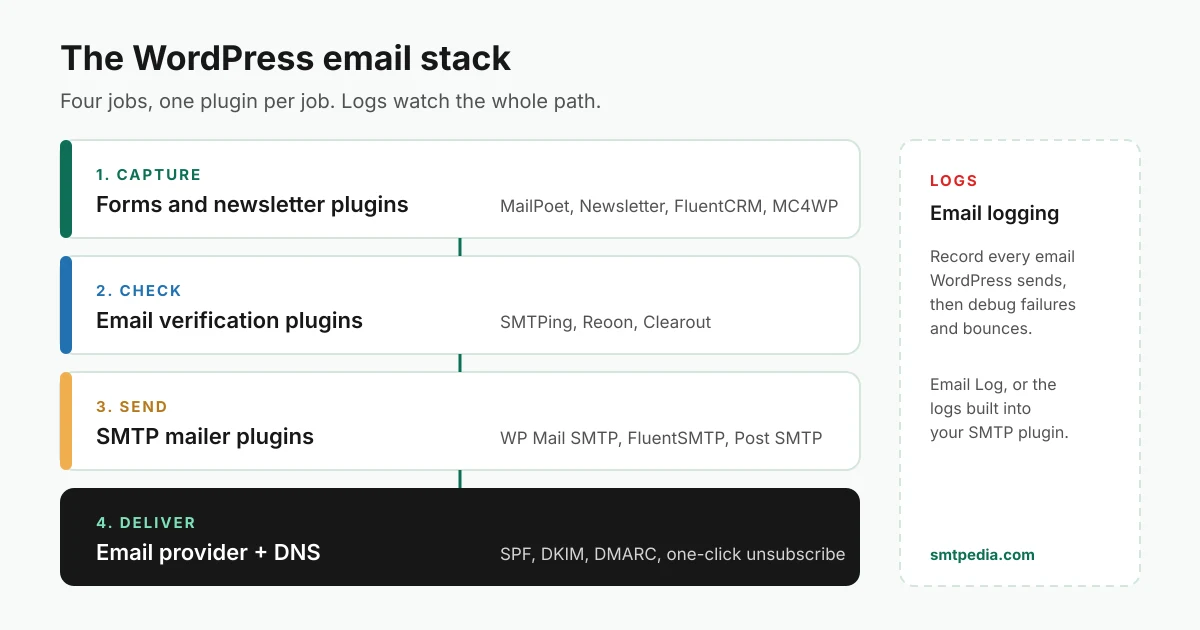
Most “best WordPress email plugins” lists mix two different jobs: sending email reliably (SMTP plugins) and marketing to a list (newsletter plugins). A working setup needs both, plus two layers those lists skip: checking addresses before you mail them, and logging what WordPress actually sent. This guide maps the whole stack, picks the strongest plugins in each layer, shows what each one costs and which Gmail, Yahoo and Microsoft sender requirement each layer covers.
Install counts, ratings, update dates and plugin sizes come from the official WordPress.org plugin directory; prices come from each vendor’s pricing page. Everything was checked on November 13, 2026.
Quick picks
| Layer | Our pick | Price | Alternatives |
|---|---|---|---|
 All layers in one | SMTPing Email Suite | Free | One plugin per layer (below) |
 Send (SMTP) | WP Mail SMTP | Free, Pro from $49/yr | FluentSMTP (free), Post SMTP |
 Newsletter | MailPoet | Free to 500 subscribers, then from $10/mo | Newsletter, FluentCRM |
 Verify | SMTPing Email Verifier | Free (25 checks/day) | Reoon, Clearout |
 Logs | Your SMTP plugin’s log | Free | Email Log |
Our top pick: SMTPing Email Suite, the free all-in-one
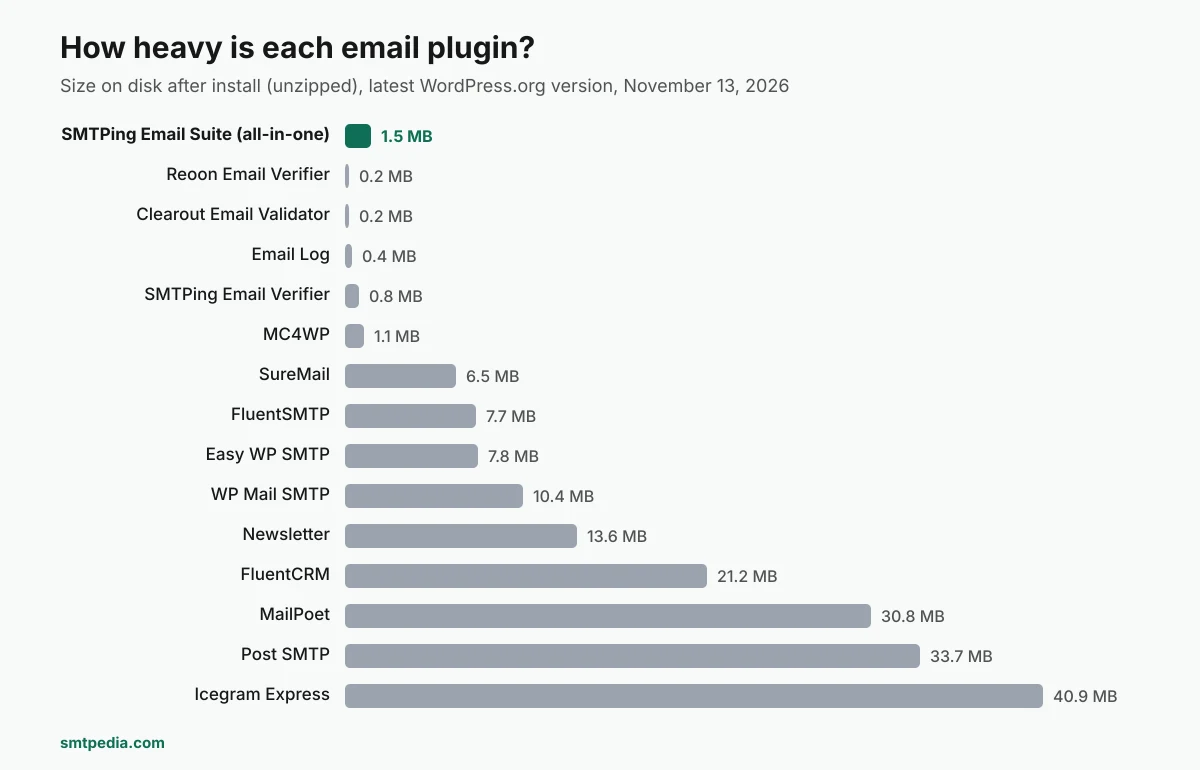
One plugin replaces the usual three or four: an SMTP mailer, a newsletter plugin, a forms plugin and an email verifier. It is free on WordPress.org, and at 1.5 MB on disk it is lighter than any SMTP plugin or self-sending newsletter plugin in this guide.
SMTPing Email Suite
12 mailers: any SMTP server, Gmail, Microsoft 365, Zoho, Amazon SES, SendGrid, Mailgun, Postmark, Brevo, SparkPost, Resend and Elastic Email. Backup connection and a background queue with 3 retries.
Every recipient is checked before the email leaves your site: invalid, spamtrap, disposable, blacklisted, complainer and spambot addresses are skipped. 25 free credits per day.
Lists, tags, double opt-in, a preference page and one-click unsubscribe. Campaigns designed in the block editor, scheduled, with opens and clicks.
Drag and drop builder with 25 field types, conditional logic, multi-step forms, 17 templates and popups. Also connects to 31 form plugins.
Welcome series, abandoned cart, new post and product announcements, weekly digest, win-back and review requests.
Dashboard, searchable email log with CSV export, and alerts by email, Slack, Discord, Microsoft Teams or webhook when an email fails.
One click checks SPF, DKIM, DMARC, MX and blocklists for your sending domain, with the exact fix for each issue.
Write emails with the AI provider connected to WordPress, and let Claude, ChatGPT or Cursor read your email stats through the WordPress MCP Adapter.
What it replaces, and what that would cost
| You need | Usual plugin | Price elsewhere | SMTPing Email Suite |
|---|---|---|---|
| SMTP with email log, backup connection and failure alerts | WP Mail SMTP Pro or Post SMTP Pro | from $49/yr (WP Mail SMTP, renews at $99) or $59.99/yr (Post SMTP) | Free |
| Newsletter with automations | MailPoet Business, Newsletter Professional or FluentCRM Pro | from $10/mo (MailPoet, 500 subscribers), 99 € (Newsletter) or $77/yr (FluentCRM, renews at $129) | Free |
| Recipient check before every send | A separate verification plugin | Paid verification credits | 25 free checks/day |
| Disk footprint | WP Mail SMTP + MailPoet | 41.2 MB unzipped | 1.5 MB |
Setup in five steps
- In WordPress, go to Plugins > Add New, search for SMTPing Email Suite, install and activate it.
- Open SMTPing > Sending and pick your mailer.
- Fill in the fields and click Test connection. It logs in without sending an email and names the exact problem if it fails: unknown host, blocked port, wrong encryption, refused login or a temporary block. A successful test saves your settings.
- Optional: paste your SMTPing API key under Check recipients before sending.
- Send a test email from the bottom of the page.
Sending, the queue, the log and alerts work without any account. An SMTPing API key is only needed for the recipient check. The newsletter features need WordPress 7.0 or later. The plugin was published on WordPress.org on October 30, 2026, so it has no install count or reviews yet.
Why WordPress email fails without plugins
Out of the box, WordPress sends every message (password resets, form notifications, WooCommerce receipts) through the wp_mail() function, which hands it to PHP mail() on your web server. That server is rarely authorized to send for your domain: it is not in your SPF record, it does not sign with your DKIM key, and shared hosting IPs often carry a poor reputation. The result is mail that lands in spam or is rejected outright.
An SMTP plugin fixes the sending path by routing wp_mail() through an authenticated provider (Google Workspace, Microsoft 365, Amazon SES, Brevo, SendGrid, Mailgun, Postmark or any SMTP server). It does not replace an email provider: you still need one, and our comparison of SMTP relay services and transactional email services helps you choose.
SMTP plugins: make WordPress send properly
Install exactly one. Every SMTP plugin overrides the same wp_mail() path, so two active at once means unpredictable results.
| Plugin | Price | Active installs | Rating | Size |
|---|---|---|---|---|
| WP Mail SMTP | Free, Pro from $49/yr | 4,000,000+ | 4.8/5 | 10.4 MB |
 FluentSMTP | Free | 700,000+ | 4.8/5 | 7.7 MB |
 Easy WP SMTP | Free, Pro from $49.50/yr | 500,000+ | 4.6/5 | 7.8 MB |
 Post SMTP | Free, Pro from $59.99/yr | 300,000+ | 4.7/5 | 33.7 MB |
 SureMail | Free | 200,000+ | 4.7/5 | 6.5 MB |
WP Mail SMTP
The most installed SMTP plugin by a wide margin. It connects WordPress to a generic SMTP server or to provider integrations such as Gmail, Brevo, SendGrid and Amazon SES, with a setup wizard. Email logging, backup connections and failure alerts are part of the Pro plans ($49 for the first year, then $99, for 1 site).
Best for: Sites that want a guided setup and paid support.
FluentSMTP
A free SMTP plugin with native connections to Amazon SES, SendGrid, Mailgun, Postmark, Cloudflare, Gmail and Brevo, plus any SMTP server. It comes from the same team as FluentCRM, so the two pair naturally.
Best for: Developers who want a free sending layer and already use FluentCRM.
Requires WordPress 6.5 or later.
Post SMTP
Email logs, failure alerts, a backup SMTP connection and a mobile app on top of Gmail, Microsoft 365, Brevo, SendGrid, Zoho and Amazon SES connections. The Pro plans add more mailers, one-click setups and bulk resend. At 33.7 MB it is the heaviest SMTP plugin here.
Best for: Sites where a missed email is costly and you want alerts on your phone.
Easy WP SMTP
A simpler SMTP plugin covering Gmail, Outlook, Office 365, Brevo, SendGrid, Mailgun, SendLayer and custom SMTP. Its paid plans list email reports, failure alerts, a backup connection and smart routing. It is listed under the same WordPress.org profile as WP Mail SMTP.
Best for: Small sites that want a light configuration screen.
SureMail
A newer entrant (listed in January 2025) from the team behind the Astra theme, advertised as 100% free, with backup connections, automatic retries and email logs.
Best for: Sites already built on the Brainstorm Force ecosystem.
Newsletter and email marketing plugins
Two families exist. Self-sending plugins (MailPoet, Newsletter, FluentCRM, Icegram Express) store subscribers in WordPress and send campaigns through your SMTP layer or their own service. Connector plugins (MC4WP) only collect sign-ups and push them to an external platform that does the sending.
| Plugin | Price | Type | Active installs | Size |
|---|---|---|---|---|
 MC4WP | Free, Premium from $59/yr | Connector (Mailchimp) | 1,000,000+ | 1.1 MB |
| MailPoet | Free to 500 subscribers, then from $10/mo | Self-sending | 500,000+ | 30.8 MB |
 Newsletter | Free, add-ons from 69 € | Self-sending | 200,000+ | 13.6 MB |
 FluentCRM | Free, Pro from $77/yr | Self-sending + CRM | 80,000+ | 21.2 MB |
 Icegram Express | Free, Max $99/yr | Self-sending | 50,000+ | 40.9 MB |
MailPoet
Newsletters, sign-up forms, blog post notifications and WooCommerce automations built into the WordPress dashboard. The free Starter plan covers up to 500 subscribers and 5,000 emails a month through the MailPoet Sending Service; Business starts at $10 a month for 500 subscribers and rises with list size.
Best for: WooCommerce shops that want campaigns without leaving WordPress.
Newsletter
One of the oldest newsletter plugins (listed since 2009), with subscription forms, unlimited subscribers and newsletters. Paid packages are one-time payments with a year of updates: Essential at 69 € for 1 site, Professional at 99 € for 3 sites with autoresponders and WooCommerce.
Best for: Blogs and associations that want a free, self-hosted list.
FluentCRM
Email marketing, newsletters, automation funnels and a CRM inside WordPress, priced by number of sites rather than contacts: Pro is $77 for the first year on 1 site, then $129.
Best for: Course creators and membership sites with large lists.
MC4WP: Mailchimp for WordPress
Adds Mailchimp sign-up forms and integrations to WordPress. It does not send campaigns: Mailchimp does, at Mailchimp’s prices. You still need an SMTP plugin for the emails WordPress itself sends.
Best for: Sites that already run their newsletter on Mailchimp.
Icegram Express (Email Subscribers & Newsletters)
Newsletters, automated post notifications and WooCommerce emails with unlimited subscribers. The paid Max plan costs $99 a year for 3 sites. The largest plugin in this guide at 40.9 MB.
Best for: Sites that mainly want automatic new-post emails.
Email verification plugins: stop bad addresses at the door
Every fake, mistyped or disposable address that enters your list costs you twice: it bounces, and bounces hurt your sender reputation. Verification plugins check the address in real time, before it reaches your list. See what email verification is for how the checks work, and our email verification tools comparison for the services behind these plugins.
SMTPing Email Verifier
Verifies addresses on WordPress forms and on every email your site sends, blocking invalid, disposable and spamtrap addresses. Version 1.6.0 turns Autopilot on by default and adds an AI and MCP tab. Already using SMTPing Email Suite? Its recipient check is built in.
Best for: Sites that want verification on every form and every outgoing email, not only on one form plugin.

Reoon Email Verifier
Real-time verification on your online forms, blocking invalid, temporary, disposable and harmful addresses. Reoon gives up to 600 free verifications a month, then works on paid credits.
Best for: Low-volume forms that fit inside Reoon’s free monthly allowance.

Clearout Email Validator
Real-time verification during form fill, blocking temporary and disposable addresses. Requires a Clearout account and its credits.
Best for: Existing Clearout customers focused on form spam.
Verification on forms works best combined with double opt-in: verification catches addresses that cannot receive mail, double opt-in proves the owner asked to join.
Email logs: know what WordPress actually sent
When a customer says the password reset never arrived, a log tells you whether WordPress sent it, to which address, and what the server answered. SMTPing Email Suite, Post SMTP and SureMail include a log in their free version; WP Mail SMTP lists email logging as a Pro feature. Otherwise, add a dedicated logger.
Email Log
Logs and displays every outgoing email from WordPress, for debugging delivery problems or keeping a record for audits.
Best for: Sites whose SMTP plugin has no free log.
If the log shows a rejection, look up the code in our SMTP error code library.
Which layer handles each Gmail, Yahoo and Microsoft requirement
Since 2024 Gmail and Yahoo, and since 2025 Microsoft, enforce rules for anyone sending to their users, with stricter rules for bulk senders. Each requirement belongs to a layer. Full details are in our sender requirements guide.
| Requirement | Handled by | What to check |
|---|---|---|
| SPF and DKIM for your domain | Email provider + DNS, reached through the SMTP plugin | The plugin sends through your provider, not PHP mail(); the provider’s DKIM is published in your DNS |
| DMARC record | DNS | A DMARC record exists (required for bulk senders) and aligns with your From domain |
| One-click unsubscribe (RFC 8058) | Newsletter plugin or its sending service | Marketing emails carry List-Unsubscribe and List-Unsubscribe-Post headers |
| Low spam complaint rate | Newsletter plugin + list practices | Clear consent, easy unsubscribe, no purchased lists |
| Low bounce rate | Verification plugin | Addresses are verified at sign-up and before large sends |
| Consent proof (GDPR) | Newsletter plugin | Double opt-in enabled, consent stored with a timestamp |
SMTPing Email Suite covers the plugin side of every row in one place: authenticated sending, a live SPF, DKIM and DMARC check, one-click unsubscribe, double opt-in and a recipient check before each send.
Recommended stacks
| Your site | Send | Newsletter | Verify | Cost |
|---|---|---|---|---|
| Any site, one free plugin | SMTPing Email Suite | SMTPing Email Suite | SMTPing Email Suite | Free |
| Blog or small business site | FluentSMTP or WP Mail SMTP | Newsletter or MailPoet | SMTPing Email Verifier | Free to start |
| WooCommerce store | WP Mail SMTP or FluentSMTP | MailPoet | SMTPing Email Verifier | MailPoet from $10/mo past 500 subscribers |
| Courses, memberships, CRM needs | FluentSMTP | FluentCRM | SMTPing Email Verifier | FluentCRM Pro from $77/yr |
| Newsletter already on Mailchimp | Any SMTP plugin for site emails | MC4WP (Mailchimp sends) | SMTPing Email Verifier | Mailchimp plan |
Common mistakes
- Two SMTP plugins active at once. They fight over the same sending path; keep one. This is where SMTPing Email Suite helps: one free plugin handles sending, newsletter and verification, so there is no second email plugin to conflict with.
- Sending newsletters through a personal Gmail account. Consumer Gmail is built for personal mail and caps daily sending; use a provider made for bulk email.
- No DKIM on the sending domain. The SMTP plugin connects, emails go out, and they still land in spam because the domain is not authenticated.
- Importing an old list without verifying it. One send to a stale list can push bounces and spamtrap hits high enough to damage your reputation for weeks.
- Forgetting site emails when using a connector. MC4WP sends nothing for WordPress itself; password resets and form notifications still need an SMTP plugin.
How we chose
A plugin had to be actively maintained (updated in 2026), compatible with current WordPress, and either widely used or doing a job no bigger plugin covers. Install counts, ratings, update dates and sizes are WordPress.org figures as of November 13, 2026; sizes are the unzipped latest stable version. Prices are the vendors’ published entry prices on the same date, before tax. Some links on this page are affiliate links.
Frequently asked questions
What is the best WordPress email plugin?
For most sites, SMTPing Email Suite: it is free and covers SMTP sending, newsletters, forms, automation and email verification in one 1.5 MB plugin. If you prefer one plugin per job, WP Mail SMTP is the most used SMTP plugin (4,000,000+ installs) and MailPoet is the most complete self-sending newsletter plugin.
What is the best free WordPress SMTP plugin?
SMTPing Email Suite, FluentSMTP and SureMail are free with no paid tier needed for core sending. SMTPing Email Suite also includes the email log, backup connection and failure alerts that WP Mail SMTP lists as Pro features.
Do I need an SMTP plugin if I use a newsletter plugin?
Usually yes. Newsletter plugins handle campaigns, but WordPress itself still sends password resets, form notifications and order emails through wp_mail(). An SMTP plugin makes those go through an authenticated provider instead of PHP mail(). An all-in-one plugin such as SMTPing Email Suite covers both.
Can I run two SMTP plugins at the same time?
No. Both override the same WordPress sending function, so results become unpredictable. Keep one SMTP plugin; if you need a backup connection, pick one that offers it, such as SMTPing Email Suite or Post SMTP.
Why do my WordPress emails go to spam?
Most often because they are sent through PHP mail() on a server that is not authorized in your SPF record and does not sign with DKIM. Install an SMTP plugin connected to a real provider, then publish SPF, DKIM and DMARC records for your domain.
Do I need an email verification plugin?
If you collect sign-ups through forms, yes. Verification blocks mistyped, fake, disposable and spamtrap addresses before they enter your list, which keeps bounces and spam complaints low enough to meet Gmail, Yahoo and Microsoft requirements.
Don’t forget to clean your list. Boost your inbox rate.
SMTPing catches what regex misses: disposable addresses, role-based emails, catch-all domains, syntax errors, and 9 more invalid types. Free tier renews every day, no card required.
Did this guide save you time?
SMTPedia is free and independent. A coffee helps keep every guide accurate.
Buy SMTPedia a coffeeAbout the Author

Alaa · LinkedIn
Email infrastructure specialist with 8+ years of hands-on experience in SMTP, deliverability, and email verification. I’ve configured and troubleshot mail systems across Postfix, Exchange, and cloud relays, managed IP reputation and warmup campaigns, and built verification pipelines processing millions of addresses. My work spans DNS authentication (SPF, DKIM, DMARC, BIMI), bounce handling, blocklist monitoring, and compliance frameworks including CAN-SPAM and GDPR. I write every article on SMTPedia to give email professionals, developers, and marketers the accurate, RFC-grounded reference they need.
About SMTPedia
SMTPedia is an independent email industry reference covering SMTP, IMAP, POP3, email deliverability, marketing platforms, DNS authentication, and email verification. Every article is researched from official provider documentation, IETF RFCs, and industry best practices. Settings and configurations are verified quarterly.
We are cited as a source by ChatGPT, Microsoft Copilot, and thousands of email professionals worldwide. Learn more about our editorial process.