
How much does EmailOctopus cost in 2026?
EmailOctopus is the cheapest credible platform covered on this site, and it gets there by a route worth understanding: it sells the same product twice, once on its own sending infrastructure and once as a front end for your own Amazon SES account. The second version costs roughly half the first. This page reproduces both price curves in full, explains where the crossover sits, and covers the one counting rule that quietly inflates bills.
Every figure below was read from emailoctopus.com/pricing, emailoctopus.com/pricing-connect and EmailOctopus’s own knowledge base on 24 August 2026.
A note on currency. EmailOctopus shows prices in USD, EUR or GBP depending on a selector, and the figures below were read in euros. At the entry tier the dollar and euro prices displayed the same numeral, which suggests the platform sets a price per currency rather than converting one into another. Check the selector for your own currency before budgeting rather than converting these figures.
EmailOctopus pricing at a glance
| EmailOctopus | EmailOctopus Connect | |
|---|---|---|
| Sends through | EmailOctopus infrastructure | Your own Amazon SES account |
| Free tier | 2,500 subscribers, 10,000 emails /month | 2,500 subscribers, unlimited emails |
| Paid entry | €9 /month billed yearly | €8 /month billed yearly |
| Email allowance | 10× subscribers | Unlimited |
| Extra cost | None | AWS charges you separately |
| Ceiling | 500,000 subscribers, then custom quote | |
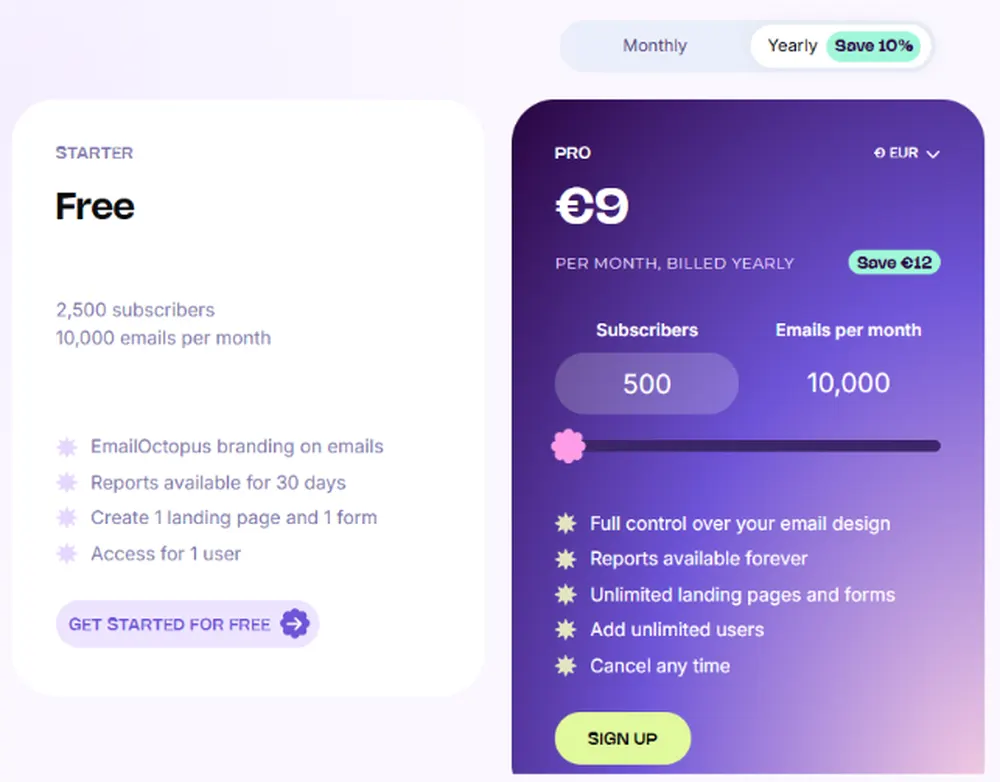
Annual billing takes 10% off and is charged twelve months upfront; it is also the option selected by default when you upgrade. Nonprofits get a 20% lifetime discount. There is no free trial. EmailOctopus points you at the free plan instead, which has no time limit and needs no card.
Both price curves, side by side
Fourteen points from the standard product’s slider, with the Connect price alongside wherever we sampled the same subscriber count. All figures are the monthly cost on annual billing.
| Subscribers | EmailOctopus | Emails included | Connect | Connect saving |
|---|---|---|---|---|
| 500 | €9 | 10,000 | €8 | −11% |
| 1,000 | €12 | 10,000 | – | – |
| 2,500 | €16 | 25,000 | €14 | −12% |
| 5,000 | €26 | 50,000 | €21 | −19% |
| 10,000 | €36 | 100,000 | €28 | −22% |
| 15,000 | €50 | 150,000 | – | – |
| 20,000 | €64 | 200,000 | – | – |
| 30,000 | €92 | 300,000 | – | – |
| 50,000 | €148 | 500,000 | €83 | −44% |
| 75,000 | €216 | 750,000 | – | – |
| 100,000 | €286 | 1,000,000 | €147 | −49% |
| 150,000 | €424 | 1,600,000 | – | – |
| 250,000 | €662 | 2,600,000 | €304 | −54% |
| 500,000 | €1,224 | 5,000,000 | €534 | −56% |
Above 500,000 subscribers both products stop and EmailOctopus asks you to contact support for a quote.
Connect costs 40 to 56% less at every point we sampled, and it removes the sending cap entirely. What you give up is not features, the two products share the same interface and the same feature comparison table, but simplicity: you have to hold an AWS account, verify your domain in SES, and get out of the SES sandbox yourself.
What the standard curve actually does
Expressed as cost per thousand subscribers per month, the standard product falls steeply and then flattens.
| Subscribers | Per 1,000 subscribers | Reading |
|---|---|---|
| 500 | €18.00 | The entry tier is poor value per head |
| 1,000 | €12.00 | Still expensive per head |
| 2,500 | €6.40 | Halves again |
| 10,000 | €3.60 | Where the curve starts to flatten |
| 50,000 | €2.96 | Nearly flat from here |
| 500,000 | €2.45 | Only 17% better than at 50,000 |
Two practical consequences. Below about 2,500 subscribers you are paying a floor price rather than a volume price, so the free tier, which covers exactly that range, is the sensible place to be. And above 50,000 the volume discount is largely spent, so growing from 50,000 to 500,000 multiplies your bill by 8.3 while multiplying your list by 10.
EmailOctopus Connect: the Amazon SES route
Connect is the same application with the sending swapped out. Instead of EmailOctopus delivering your email, you connect your own Amazon SES account and EmailOctopus routes through it. You pay EmailOctopus a smaller subscription and pay Amazon directly for delivery.
What Amazon charges on top
EmailOctopus documents the AWS side in its knowledge base, and the figure is small.
| AWS situation | What you pay Amazon |
|---|---|
| New AWS account, free plan | $100 in credits at signup, up to $100 more for completing activities |
| Free plan duration | Up to 6 months, or until credits run out |
| After that | About $0.10 per 1,000 emails |
| Accounts created before 15 July 2025 | First 3,000 emails a month free in year one, then $0.10 per 1,000 |
| Other charges from connecting | None |
The AWS free plan has a deadline attached to it. EmailOctopus’s own wording is that the plan lasts up to six months or until the credits are spent, after which you are asked to upgrade, and that if you do not upgrade within 90 days, “your AWS account will be closed”. That is a harder consequence than most trial expiries, and it applies to the account your sending depends on. Diarise it.
Working out which product is cheaper for you
Because Connect has no send limit and the standard product allows ten emails per subscriber, the comparison depends entirely on how often you mail.
| Scenario | EmailOctopus | Connect plus AWS | Cheaper |
|---|---|---|---|
| 10,000 subs, 4 emails each (40,000) | €36 | €28 + about $4 | Connect |
| 10,000 subs, 10 emails each (100,000) | €36 | €28 + about $10 | Roughly level |
| 50,000 subs, 10 emails each (500,000) | €148 | €83 + about $50 | Connect |
| 100,000 subs, 20 emails each (2,000,000) | Cap exceeded | €147 + about $200 | Connect, and it is the only option |
| 500,000 subs, 10 emails each (5,000,000) | €1,224 | €534 + about $500 | Connect |
EmailOctopus and Connect figures are the published monthly prices on annual billing. AWS figures are our own arithmetic from the $0.10 per 1,000 rate EmailOctopus documents, and are approximate because SES pricing varies by region and by whether you take a plan or à la carte. The two columns mix currencies for that reason.
Connect wins on price in every scenario we costed, and the gap widens as you send more. The standard product’s advantage is that it is one bill, one vendor and one support conversation. If your sending is modest and you would rather not administer an AWS account, that is worth something. If you are already on SES for anything else, Connect is close to a free upgrade.
How subscribers are counted, and the one real trap
EmailOctopus’s counting rules are unusually generous, with a single significant exception.
Unsubscribes and bounces do not count. EmailOctopus states plainly that it counts only subscribed contacts, and that “contacts who have unsubscribed or have been removed due to a bounce/complaint do not count towards your subscriber total”. That is materially better than several competitors on this site. Drip keeps billing unsubscribers until you deactivate them, and Omnisend bills non-subscribers who never opted in at all. Here, list decay reduces your bill automatically.
The exception: duplicates across lists are billed twice. EmailOctopus states that each list is completely independent, “so if you have duplicates across your lists, they will be counted multiple times towards your billing”, and recommends keeping all contacts on a single list to avoid it. A person on your newsletter list and your customers list is two subscribers as far as your invoice is concerned. On a platform whose entire appeal is low cost, running five overlapping lists is the quickest way to lose that advantage.
Upgrades, downgrades and the annual lock-in
| Event | What happens |
|---|---|
| List outgrows your tier | Automatic immediate upgrade, and you are charged the difference straight away |
| Upgrade on an annual plan | Difference prorated across the month you are in plus the remaining months of the year |
| You need more sending, not more contacts | Manual upgrade via “Change quotas” on the account page |
| List shrinks, monthly plan | Automatic downgrade at the next billing period, if “Optimise plan pricing” is on |
| List shrinks, annual plan | No downgrade until the twelve months are up |
The annual discount costs you flexibility in one direction only. Upgrades on an annual plan happen immediately and are billed immediately. Downgrades cannot happen mid-year at all. EmailOctopus states it “wouldn’t be possible to downgrade to a lower tier mid-year”. So a seasonal list that peaks in December and shrinks in January pays the December tier until the anniversary. Note too that automatic downgrades are opt-in: the “Optimise plan pricing” setting has to be switched on, or the tier only comes down when you do it by hand.
The free plan, and what the paid tier actually unlocks
EmailOctopus’s free tier is one of the more usable ones in this category, and the gap to Pro is narrow.
| Free | Pro | |
|---|---|---|
| Subscribers | 2,500 | Up to 500,000 |
| Emails per month | 10,000 standard, unlimited on Connect | 10× subscribers, or unlimited on Connect |
| EmailOctopus branding on emails | Present | Removable |
| Report retention | 30 days | Forever |
| Landing pages and forms | 1 each | Unlimited |
| Users | 1 | Unlimited |
| Email design control | Limited | Full |
Note the free tier’s send allowance on the standard product: 10,000 emails against 2,500 subscribers is four emails per subscriber per month, not the ten you get on paid tiers. On Connect the free tier has no send limit at all, because Amazon is doing the sending and billing you for it.
There is no time limit and no card required. EmailOctopus is explicit that it offers no free trial and considers the free plan the substitute, which is a more honest arrangement than a fourteen-day countdown.
Six things that catch people out
- Duplicates across lists are billed separately. The single most expensive mistake available on this platform. Keep one list.
- Annual plans cannot be downgraded mid-year. Upgrades are instant and billed instantly; reductions wait for the anniversary.
- Automatic downgrades are opt-in. “Optimise plan pricing” must be switched on or your tier never comes back down on its own.
- Connect’s AWS free plan expires. Six months or credits spent, then an upgrade prompt, and an account closure after 90 days if ignored.
- The free tier’s send ratio is worse than the paid one. Four emails per subscriber free, ten per subscriber paid.
- The volume discount is spent by 50,000 subscribers. Beyond that the curve is nearly flat, so scale stops helping.
Who EmailOctopus is priced for
EmailOctopus competes on price and does not pretend otherwise. At €36 a month for 10,000 subscribers and a million emails it undercuts most of the platforms covered on this site by a wide margin, and Connect undercuts EmailOctopus itself by another 40 to 56%. The counting rules are fair, the free tier is real, and the pricing page has no unpriced items on it.
What you are not buying is depth. There is no ecommerce revenue attribution, no SMS, no deliverability consultancy, no dedicated IP option on the published pricing, and the automation offering is modest by comparison with the marketing platforms elsewhere on this site. The product is a newsletter and light-automation tool, priced accordingly.
Good fit: newsletters and content businesses of any size, where the job is sending well-designed email to a clean list; anyone already running Amazon SES, for whom Connect is close to free; cost-sensitive senders above 50,000 subscribers, where the absolute numbers are hard to beat; nonprofits, given the 20% lifetime discount.
Poor fit: ecommerce teams needing revenue attribution and cart recovery; anyone wanting SMS or multichannel in one bill; teams with genuinely separate audiences that must live on separate lists, who will pay for the overlap; lists under about 1,000 where the per-head cost is high, though the free tier covers most of that range anyway.
How to size EmailOctopus in four steps
- Deduplicate before you price. Count unique people across all lists, then decide whether to consolidate. This is worth doing before the first invoice, not after.
- Work out your emails per subscriber per month. Under ten and the standard product fits; over ten and you are either upgrading tiers for sending headroom or moving to Connect.
- Decide whether you will run an AWS account. If yes, Connect is cheaper at every volume we costed. If that is a maintenance burden you do not want, the standard product’s premium is what you are paying to avoid it.
- Take the annual discount only if your list is stable or growing. It saves 10%, but a list that shrinks is stuck at its peak tier until the year is out.
Frequently asked questions
How much does EmailOctopus cost?
The standard product starts at €9 a month billed yearly for 500 subscribers and 10,000 emails, rising through fourteen published tiers to €1,224 a month for 500,000 subscribers and 5,000,000 emails. Sample points: €16 at 2,500 subscribers, €36 at 10,000, €148 at 50,000 and €286 at 100,000. EmailOctopus Connect, which routes through your own Amazon SES account, is cheaper at every tier, €8, €14, €28, €83 and €147 at those same subscriber counts. Monthly billing costs about 10% more than annual. Above 500,000 subscribers the price is a custom quote.
What is EmailOctopus Connect and is it worth it?
Connect is the same application sending through your own Amazon SES account rather than EmailOctopus’s infrastructure. It costs 40 to 56% less at every tier we sampled and removes the email send limit entirely, the free Connect tier has unlimited sending against 2,500 subscribers. In exchange you hold the AWS account, verify your domain in SES and handle the sandbox exit yourself, and Amazon bills you about $0.10 per 1,000 emails separately. If you already use SES, Connect is close to a free upgrade. If administering AWS is not something you want to take on, the standard product’s premium is the price of avoiding it.
Does EmailOctopus charge for unsubscribed contacts?
No, and this is one of its better features. EmailOctopus states it counts only subscribed contacts, and that people who have unsubscribed or been removed for a bounce or complaint do not count toward your subscriber total. That contrasts sharply with several competitors: Drip continues billing unsubscribers until you manually deactivate them, and Omnisend bills non-subscribers who never opted in. On EmailOctopus, natural list decay reduces your bill rather than preserving it.
Am I charged twice for a contact on two lists?
Yes. EmailOctopus states that each list is completely independent and that duplicates across lists “will be counted multiple times towards your billing”, and it recommends keeping all contacts on one list to avoid this. Someone subscribed to both your newsletter and your product updates counts as two billable subscribers. On a low-cost platform this is the fastest way to lose the cost advantage, so deduplicate and consolidate before you pick a tier.
How many emails do I get for my subscriber count?
Ten per subscriber per month on paid standard tiers, with a floor of 10,000 emails at the smallest tiers. So 2,500 subscribers gives 25,000 emails, 10,000 gives 100,000, and 100,000 gives 1,000,000. The ratio drifts slightly upward at the top, 150,000 subscribers gives 1,600,000 emails rather than 1,500,000. The free tier is less generous at four emails per subscriber: 2,500 subscribers and 10,000 emails. Connect has no send limit at any tier.
Is the EmailOctopus free plan time-limited?
No. EmailOctopus states it does not offer a free trial and recommends the free plan instead, with no time limit and no credit card required. It covers 2,500 subscribers and 10,000 emails a month on the standard product, or 2,500 subscribers with unlimited sending on Connect. The limitations are EmailOctopus branding on your emails, 30-day report retention, one landing page, one form, one user and reduced control over email design.
What happens when my list grows past my plan?
EmailOctopus upgrades you automatically and immediately, and charges the difference at the same time. On an annual plan the charge is prorated across the month you are in plus the remaining months of the annual term, its own example is upgrading in June on a plan that started in May, which bills the difference for eleven months. You can also upgrade manually through the “Change quotas” button, which is the route to take if you need more sending volume rather than more contacts.
Can I downgrade if my list shrinks?
On monthly plans yes, at the start of the next billing period, but only if you enable the “Optimise plan pricing” setting on your account page, it is not on by default. On annual plans you cannot downgrade mid-year at all; EmailOctopus states it “wouldn’t be possible to downgrade to a lower tier mid-year”, so the change waits for the anniversary. Manual downgrades through “Change quotas” take effect on the next billing date.
What does Amazon charge on top of Connect?
About $0.10 per 1,000 emails once you are on a paid AWS footing. New AWS accounts start on a free plan with $100 in credits at signup and up to $100 more for completing activities, lasting up to six months or until the credits run out. EmailOctopus warns that after that you are asked to upgrade the AWS account, and that failing to do so within 90 days results in the account being closed. Accounts created before 15 July 2025 keep the older arrangement of 3,000 free emails a month in year one. EmailOctopus confirms no other charges arise from the connection itself.
Are there discounts?
Two published ones. Annual billing saves 10% against monthly and is charged twelve months upfront; it is preselected when you upgrade. Nonprofits receive a 20% lifetime discount. Above 500,000 subscribers EmailOctopus asks you to contact it for a custom quote, which implies negotiated pricing at that scale but publishes no rate.
Continue reading about EmailOctopus
Pricing is one part of the evaluation, and with Connect the sending configuration is most of the rest. For connection details, Amazon SES setup, authentication and deliverability behaviour, see the SMTP settings, API and integrations tabs on this platform. The alternatives tab compares EmailOctopus against the other low-cost newsletter platforms and against sending directly on SES.
Sources. All figures were read from emailoctopus.com/pricing and emailoctopus.com/pricing-connect on 24 August 2026, with every tier read individually from the live slider rather than interpolated, and from the knowledge base articles “How EmailOctopus’s pricing works” and “Amazon SES costs” the same day. Prices are as displayed in euros; EmailOctopus also publishes USD and GBP. Cost-per-thousand and AWS estimates are our own arithmetic and labelled as such. Prices change; where a figure here disagrees with the vendor’s page, the vendor’s page is correct and we would be glad to be told.
This review follows our email infrastructure testing methodology. We disclose affiliate relationships in our editorial independence policy.