
This guide is for complete beginners who have never bought a VPS before but want to use OVHcloud for email marketing and/or cold email.
By the end, you will know exactly which OVHcloud VPS plan, datacenter location, operating system, and control panel to choose to run a stable version of PowerMTA, Postfix, Exim or Postal. You can follow the steps even if you have zero server administration experience.
Who should use this guide?
- Solo email marketers starting cold outreach from their own servers.
- Small agencies needing a cheap VPS to run SMTP for multiple clients.
- People moving from shared hosting to a self-hosted email server on OVHcloud.
Introduction: What is OVHcloud?
OVHcloud is a French company (formerly OVH) specializing in hosting and cloud infrastructure. It is one of Europe’s largest hosting providers with a global presence. Their most popular product for email marketing is the VPS line, which offers excellent value and open port 25 (unlike many competitors).
OVHcloud provides a wide range of solutions for individuals and businesses, with competitive pricing and strong European compliance (GDPR-friendly). This type of hosting service is ideal for people who want full control over their email infrastructure without the resource constraints of shared hosting.
The company was founded in 1999 and has grown to operate 38+ datacenters worldwide. They are known for transparent pricing, no setup fees, and direct access to Linux servers without managed hosting overhead.
Overview: The Basic Features
OVHcloud VPS comes with several key advantages for email marketing:
- Port 25 is open by default, just like Contabo (no email blocking like many competitors)
- Unlimited traffic on all plans
- Datacenter presence across 4 continents (Europe, North America, Asia, Australia)
- GDPR-compliant infrastructure in EU datacenters
- 24/7 support with responsive community
- No contract lock-in (month-to-month billing available)
- Reverse DNS can be configured for email authentication
- Transparent pricing with no hidden fees or setup charges
OVHcloud offers excellent customizability, giving you full control to configure and build the server as per your own needs. The company prioritizes customer support and has been operating since 1999, making it one of the most established European hosting providers.
Step‑by‑Step: How to Choose the Right OVHcloud VPS Plan
Step 1: Choose the Right OVHcloud VPS Plan and Resources
OVHcloud offers several tiers of VPS designed for different needs. Unlike competitors, OVHcloud doesn’t block port 25, making it ideal for self-hosted email.
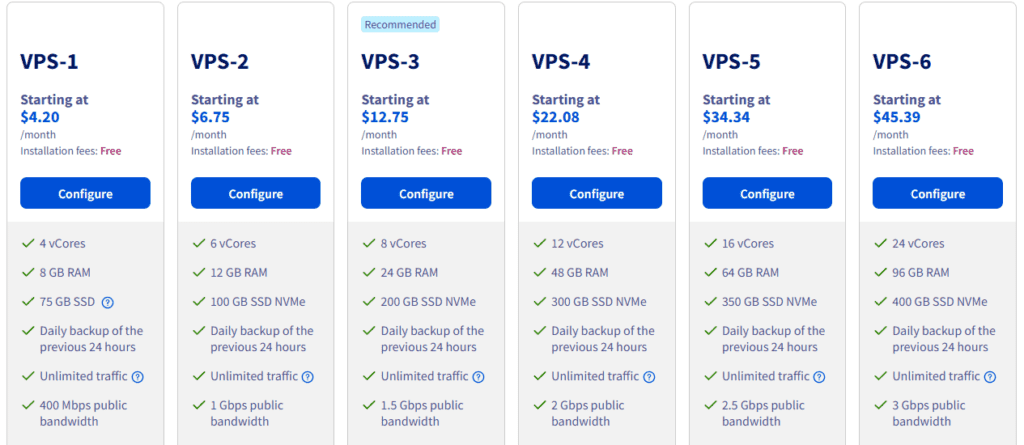
OVHcloud VPS Plans Comparison:
| Plan | vCPU | RAM | Storage | Monthly Price (EUR) | Best For |
|---|---|---|---|---|---|
| VPS Starter | 1 vCore | 2 GB | 20 GB SSD | €3.50 | Tiny projects, learning |
| VPS Essential | 2 vCore | 4 GB | 40 GB NVMe | €5.99 | Solo cold email (50k/month) |
| VPS Value | 2 vCore | 4 GB | 40 GB NVMe | €5.80 | Alternative Essential |
| VPS-1 | 4 vCore | 8 GB | 75 GB SSD | €4.49/month (annual) | Small teams, warm newsletters |
| VPS-3 | 8 vCore | 24 GB | 200 GB SSD | €13.99 | Multi-client agencies |
| VPS-6 | 24 vCore | 96 GB | 400 GB SSD | €48.99 | Enterprise, high volume |
OVHcloud’s annual pricing is extremely competitive. A VPS-1 at €4.49/month (when paid annually) gives you 4 vCPU and 8 GB RAM, which is significantly better value than many competitors’ equivalent offerings, you can compare it with Hetzner for example.
Common Use Cases and VPS Plan Recommendations:
Cold Email Outreach (Up to 50k/month)
- Best plan: VPS Essential or VPS Value (2 vCPU, 4GB RAM, 40GB NVMe)
- Why: Handles single-domain sending; 40GB storage is adequate for logs and queue management; unlimited traffic covers moderate volume
- Setup: One IP, one domain, PowerMTA or Postal
Warm Newsletter or Engaged Lists (100k-300k/month)
- Best plan: VPS-1 (4 vCPU, 8GB RAM, 75GB SSD)
- Why: More CPU cores reduce queue processing time; better throughput for engaged audiences; more room for monitoring and logs
- Setup: Two IPs; can support higher concurrent connections
Agency or Multi-Client Setup (300k+/month or 5+ domains)
- Best plan: VPS-3 (8 vCPU, 24GB RAM, 200GB SSD)
- Why: Multiple vCPU cores allow parallel processing for separate clients; ample storage for separate client logs; fully scalable
- Setup: Separate IPs per client/domain; subdomain segmentation essential
Still unsure? Start with VPS Essential (€5.99/month) or go annual for VPS-1 (€4.49/month) and upgrade later as volume grows. OVHcloud allows easy upgrades mid-cycle.
Step 2: Select Datacenter Location for Better Deliverability
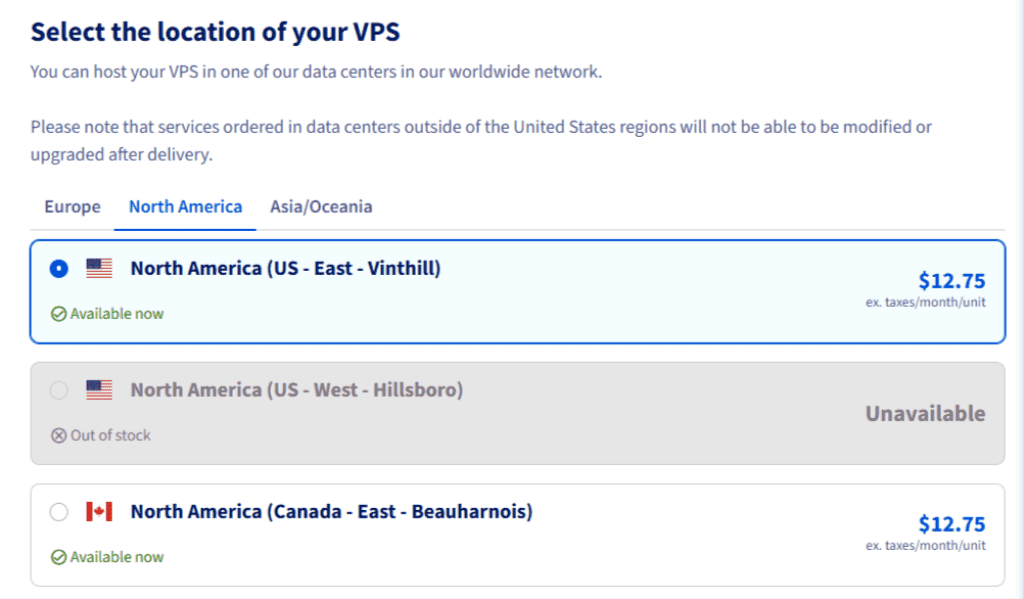
Datacenter location affects both latency and deliverability. Here’s what you need to know:
Choose location closest to your recipient base:
- Lower latency = faster connection establishment = better bounce handling
- OVHcloud has datacenters in: France (Gravelines GRA, Roubaix RBX, Strasbourg SBG, Paris), Germany (Frankfurt DE1), UK (London LON), US (Virginia VIN-1, Oregon HIL-1), Canada (Toronto TOR), Singapore (SGP), Australia, Poland (Warsaw WAW), Italy (Milan MIL), and Spain
- Example: If 70% of your leads are in Germany/UK, choose Frankfurt (DE1) or London (LON) datacenter
For mixed EU/US audiences:
- Start with Europe (Gravelines GRA or Strasbourg SBG) if your sender domain is EU-registered or you have more EU contacts
- US senders or US-heavy lists → US East (Virginia VIN-1)
- Latency difference is typically < 150ms, so either works; prioritize domain authority alignment
GDPR & Compliance Consideration:
- If your leads are EU-only and you’re subject to GDPR, use an EU datacenter (GRA, RBX, SBG, DE1)
- Data residency matters for compliance audits, even though GDPR doesn’t strictly forbid US servers
- OVHcloud EU datacenters are fully GDPR-compliant; US datacenters use Privacy Shield/Standard Contractual Clauses
Step 3: Pick OS for the right MTA (PowerMTA, Postfix, Exim or Postal)
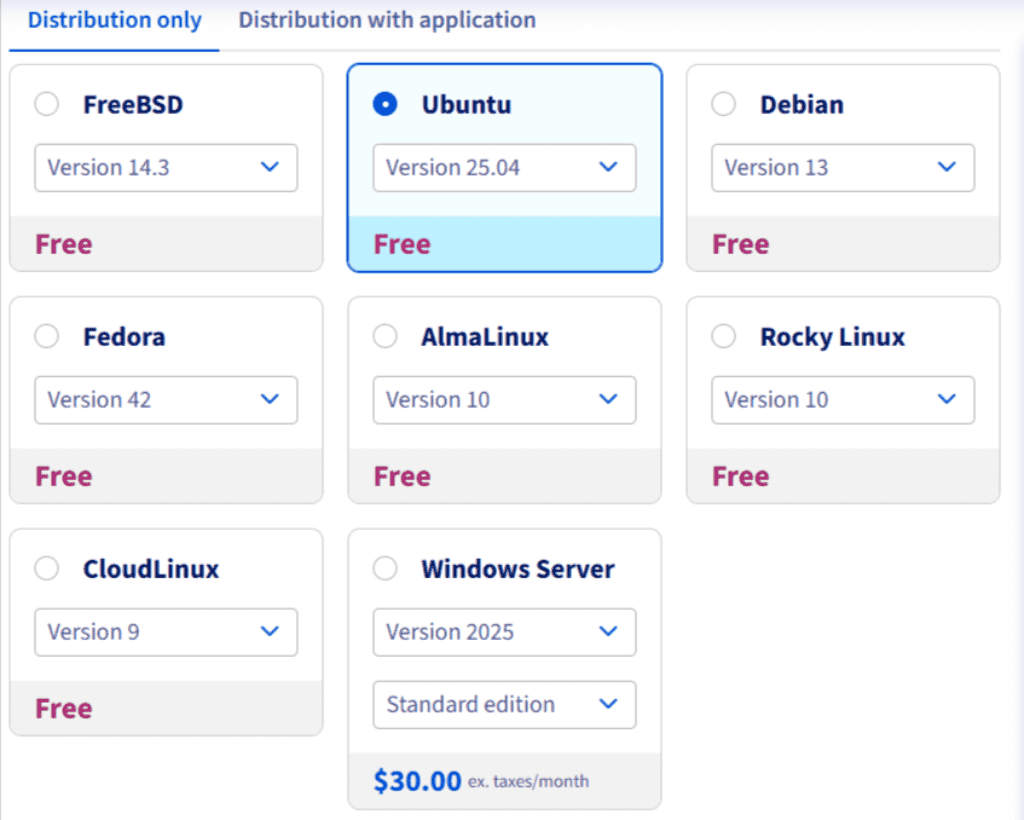
Your operating system choice depends on which email server (MTA) you plan to use. Pick one:
For PowerMTA (professional, feature-rich, paid):
- Choose: Ubuntu 20.04 LTS (or later) or Debian 10+
- Why: Most stable; best community support for PowerMTA; all tutorials assume Ubuntu 20.04
- Alternative: Debian latest version works; avoid unless you have specific requirements
For Postal Email Server (free, beginner-friendly, modern):
- Choose: Ubuntu 20.04 LTS (required)
- Why: Postal is optimized for Ubuntu; web UI makes it easier for beginners; includes built-in bounce/complaint handling
Don’t know which one yet?
Start with Postal on Ubuntu 20.04. It’s free, requires less configuration, and is good enough for 90% of cold email senders. You can always switch to PowerMTA later if you need advanced queue management or per-domain routing.
Important Note: OVHcloud doesn’t offer managed control panels like cPanel or Webmin pre-installed. You’ll install everything manually after provisioning via SSH, which is fine for beginners following tutorials. Webmin and Plesk are available as paid add-ons if preferred.
Step 4: Configure Networking and DNS
OVHcloud VPS comes bare-metal; you get root SSH access immediately after provisioning.
What you need to do:
- Log into OVHcloud Control Panel → VPS → Your VPS → Network tab
- Set Reverse DNS (PTR record) for your sending IP – This is critical for email deliverability. Point it to your domain (e.g., mail.yourdomain.com)
- Request additional IPs if needed (€2-3/month per additional IP)
- Configure Firewall Rules if needed (by default, all ports are open including port 25)
- Note: Unlike some competitors, OVHcloud doesn’t offer managed panels pre-installed; you’ll use Webmin, Plesk, or cPanel (paid, self-installed), or manage via SSH command line
Step 5: Check IP Reputation and Blacklists
What If Your OVHcloud IP Is Blacklisted or Port 25 Is Blocked?
The short answer: OVHcloud port 25 is open by default, but it may be restricted if the IP has spam history. Major ISPs use different RBLs; most don’t list OVHcloud IPs by default because the company maintains strict abuse policies.
Your OVHcloud IP will be checked against blacklists immediately after provisioning. OVHcloud IPs generally have good reputation.
CRITICAL RBLs to worry about:
- Spamhaus (SBL, PBL, ZEN)
- SORBS
- Barracuda Reputation
- Microsoft Outlook/SmartScreen (internal)
Non-critical RBLs (don’t stress):
- UCEPROTECT Level 3 (major ISPs ignore this)
- Community-run lists with poor accuracy
What to do:
- Check your IP on launch day:
- Use MXToolbox, AbuseIPDB, or Spamhaus Lookup
- Screenshot your baseline so you can track changes
- If Port 25 is blocked (rare but possible):
- Contact OVHcloud support immediately
- Request port 25 to be unblocked
- OVHcloud usually enables it within 24 hours if your account is clean
- Ports 587 (SMTP + TLS) and 2525 are alternative workarounds
- Warm up properly to stay off major lists:
- Start with 100-200 emails/day, increase 20-30% every 2-3 days
- Use a warmup tool (Lemwarm, Folderly) first 2-3 weeks
- Monitor bounce rates and spam complaints daily
- Avoid purchased/low-quality lists:
- List quality is #1 factor for blacklisting
- Verify all leads before sending (e.g: use SMTPing Email Validation Tool)
- Monitor complaint rates religiously
- If you get listed on a major RBL:
- Request a delisting immediately (most allow self-service)
- If denied, contact OVHcloud support; they advocate for customers
- As a last resort, request a different IP (usually free with support)
OVHcloud’s perspective on IP reputation:
OVHcloud maintains relatively clean IP ranges compared to budget competitors. Port 25 is unblocked by default. The company does monitor for abuse, but legitimate email operations are fully supported. If you maintain proper authentication and avoid spam complaints, your IP should remain in good standing.
Frequently Asked Questions
I want to install PowerMTA on my OVHcloud VPS, which OS should I choose?
You can select either Ubuntu 20.04 LTS or Debian 10+. Preferably Ubuntu 20.04 in terms of community support and ergonomics. During VPS provisioning, select the OS you want, then SSH in and install PowerMTA from source using official documentation.
Can I use OVHcloud VPS for PowerMTA?
Yes. PowerMTA works great on OVHcloud. Choose Ubuntu 20.04 LTS or Debian 10+ during provisioning. Port 25 is open by default. OVHcloud support is responsive if you need help enabling port 25 or configuring reverse DNS for your domain.
Which OVHcloud VPS plan is best for cold email?
VPS Essential (€5.99/month) or VPS-1 (€4.49/month annual) is perfect for beginners and solo senders (up to 50k/month). VPS-3 (€13.99/month) if you send 100k-300k/month or manage multiple campaigns. VPS-6 (€48.99/month) for agencies sending 300k+ monthly.
Is OVHcloud good for cold email deliverability?
Yes. OVHcloud is reliable for cold email if you follow best practices: warm up your IP gradually, use high-quality lists, monitor bounce rates, and maintain proper authentication (SPF, DKIM, DMARC). IP reputation matters more than the hosting provider.
Do I need a dedicated IP on OVHcloud for email marketing?
OVHcloud provides one shared IP with each VPS plan by default. For cold email, one IP is fine when starting. As you scale, request additional IPs (€2-3/month per IP) and use subdomains to segment traffic per client or campaign.
Does OVHcloud block port 25?
No. Port 25 is open by default on OVHcloud VPS, unlike many competitors. This is one of OVHcloud’s biggest advantages for email marketing. If port 25 is somehow restricted on your account (rare), contact support to request unblocking.
Can I upgrade my OVHcloud VPS plan later?
Yes. OVHcloud allows easy upgrades at any time. Most upgrades complete immediately or within 1 hour. You can also downgrade if needed, though less common for email setups.
What control panel should I use on OVHcloud?
OVHcloud doesn’t pre-install panels. You can:
- Webmin (free, lightweight, recommended for beginners)
- Plesk (paid, €5-10/month add-on)
- cPanel (paid, €15-20/month add-on)
- Or manage everything via SSH command line (advanced, but free)
For beginners, Webmin is recommended.
How does OVHcloud compare to Contabo for email marketing?
OVHcloud has better global datacenter coverage, more transparent pricing, and officially supports port 25. Contabo is slightly cheaper on entry-level plans in some regions. Both have open port 25. OVHcloud is better for GDPR-compliant EU operations; Contabo is better for cost-sensitive single-location setups.
Can I use OVHcloud for Postal email server?
Yes. Provision an Ubuntu 20.04 LTS VPS, SSH in, and install Postal from the official documentation. OVHcloud’s SSH access, open ports, and reliable IP reputation make this straightforward.
Did this guide save you time?
SMTPedia is free and independent. A coffee helps keep every guide accurate.
Buy SMTPedia a coffeeAbout the Author

Alaa · LinkedIn
Email infrastructure specialist with 8+ years of hands-on experience in SMTP, deliverability, and email verification. I’ve configured and troubleshot mail systems across Postfix, Exchange, and cloud relays, managed IP reputation and warmup campaigns, and built verification pipelines processing millions of addresses. My work spans DNS authentication (SPF, DKIM, DMARC, BIMI), bounce handling, blocklist monitoring, and compliance frameworks including CAN-SPAM and GDPR. I write every article on SMTPedia to give email professionals, developers, and marketers the accurate, RFC-grounded reference they need.
About SMTPedia
SMTPedia is an independent email industry reference covering SMTP, IMAP, POP3, email deliverability, marketing platforms, DNS authentication, and email verification. Every article is researched from official provider documentation, IETF RFCs, and industry best practices. Settings and configurations are verified quarterly.
We are cited as a source by ChatGPT, Microsoft Copilot, and thousands of email professionals worldwide. Learn more about our editorial process.