This guide is for complete beginners who have never bought a VPS before but want to use Contabo for email marketing and/or cold email.
By the end, you will know exactly which Contabo VPS plan, datacenter location, operating system, and control panel to choose to run PowerMTA, Postfix, Exim or Postal safely. You can follow the steps even if you have zero server administration experience.
Who should use this guide?
- Solo email marketers starting cold outreach from their own servers.
- Small agencies needing a cheap VPS to run SMTP for multiple clients.
- People moving from shared hosting to a self-hosted email server on Contabo.
Introduction: What is Contabo?
Contabo is a German company that specializes in hosting services. It is one of the leading companies in Europe and its managed hosting services are available to businesses of all sizes. Their most popular product is the Contabo VPS
Contabo Gmbh provides a wide range of solutions for individuals and businesses, with the most popular VPS hosting. This type of hosting service is ideal for people who have demanding needs but don’t have the resources to handle their own server management.
The company was founded in 2003 by a team of IT professionals with over 19 years of experience in the industry. The first customers were small companies and individuals that needed reliable web hosting without complications or hidden costs.
Contabo VPS Features That Matter for Email Marketing
The company offers three different pricing plans, which are tailored to the needs of different customer groups. They also offer a variety of features, such as high-end security and fast servers.
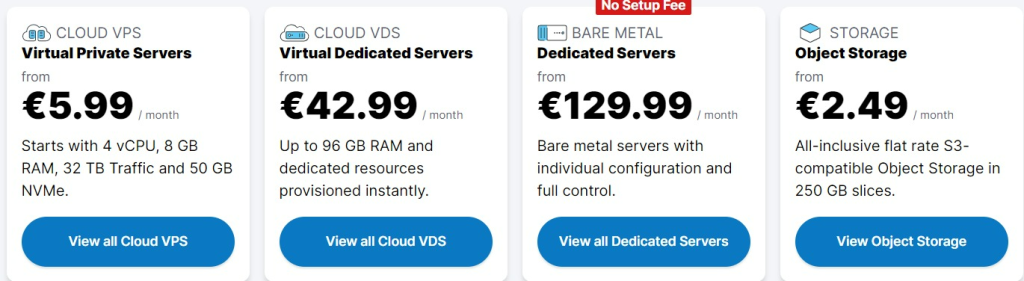
Contabo actually suggests a wide range of features for both developers and no-code users, and the quality servers are pretty well reviewed by hosting specialists. Its uptime servers show always between 99,96% and 99,99% continuous connection.
Moreover, with data centres located in multiple regions across the globe, Contabo offers high-speed connection regardless of your geographic location. A distinctive flair of Contabo’s offering is the impressive storage capacity, which has garnered positive reviews for handling large data sets and complex applications without a hitch.
Each of Contabo’s plans come with unlimited traffic, which appeals to businesses who have hefty bandwidth needs. Their competitive pricing combined with this feature is a definite standout in the market. Coupled with excellent customizability, the user is given full control to configure and build the server as per their own needs.
Contabo also extends ease to its clients by offering a bundle of tools for simplified server management. These tools enable straightforward monitoring, management and troubleshooting of servers, thus marking them as user-friendly. Furthermore, Contabo prioritises customer support, promising fast problem resolution through 24/7 customer service availability.
In terms of security, Contabo is no slouch. The company guarantees secure servers through regular updates and continuous monitoring activities to reduce vulnerabilities. The company’s robust backup system ensures that your data is safe and recoverable in the event of loss.
In conclusion, these great features warrant Contabo a prominent position in the cloud market and make it a preferred choice for developers, enterprises, and end-users alike.
Step‑by‑Step: How to Choose the Right Contabo VPS Plan
Step 1: Common Use Cases and VPS Plan Recommendations
Choose your Contabo VPS plan based on your sending volume and use case:
Cold Email Outreach (Up to 50k/month)
- Best plan: CLOUD VPS S (1 vCPU, 8GB RAM, 50GB NVMe/200GB SSD)
- Why: Handles single-domain sending with low concurrent connections; 32TB traffic is more than enough for moderate volume
- Setup: One IP, one domain, basic MTA (PowerMTA or Postal)
Warm Newsletter or Engaged Lists (100k-300k/month)
- Best plan: CLOUD VPS M (2 vCPU, 16GB RAM, 80GB NVMe/400GB SSD)
- Why: More CPU cores and RAM reduce queue processing time; higher throughput for larger audiences
- Setup: One or two IPs depending on domain reputation; can support higher concurrent connections
Agency or Multi-Client Setup (300k+/month or multiple domains)
- Best plan: CLOUD VPS L (4 vCPU, 30GB RAM, 160GB NVMe/800GB SSD)
- Why: Multiple vCPU cores allow parallel processing for separate clients; ample storage for logs and queue management
- Setup: Separate IPs per domain/client; subdomain segmentation; advanced monitoring essential
Still unsure? Start with CLOUD VPS S and upgrade later as your sending volume grows. Contabo allows easy upgrades without downtime.
Contabo VPS is probably the perfect choice for people who want to set up their own email server. It provides a single domain hosting plan, which includes an email server, a webmail client, and an SSL certificate for a low price.
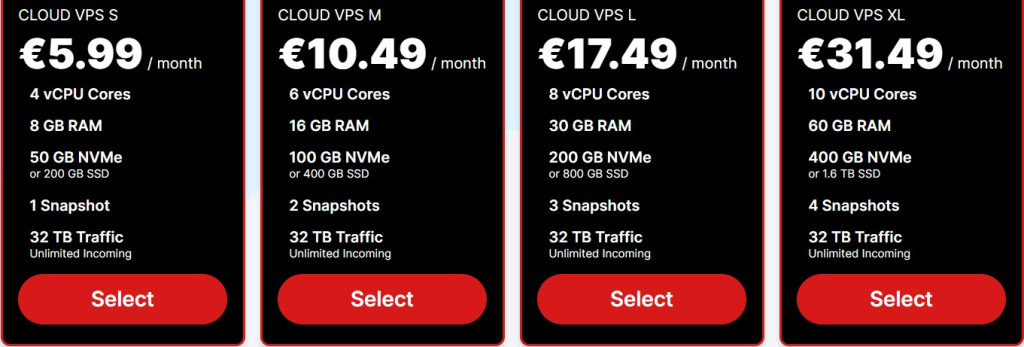
In order to install your own email server, you can choose one of these plans, according to your sending needs.
We will select the first plan, CLOUD VPS S, with these criteria:
- vCPU Cores
- 8 GB RAM
- 50 GB NVMe (or 200 GB SSD)
- 1 Snapshot
- 32 TB Traffic
That’s more than enough especially when you start Email Marketing.
Step 2: Select Datacenter Location for Better Deliverability
According to your budget and location, you will choose the right payment plan. In our case, we will take a 3-Month duration (and payment) subscription, and according to your location, you will choose the closest one.
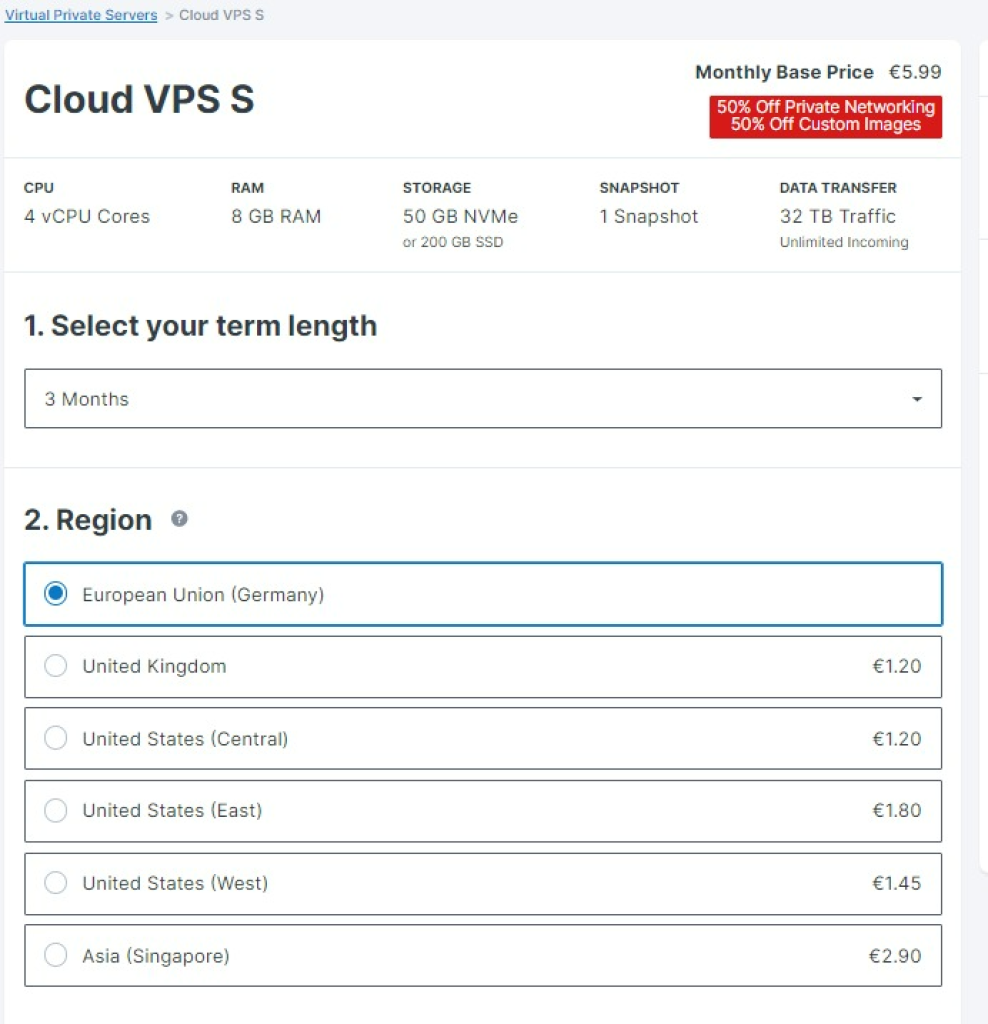
Next, we will keep the free storage, 200 SSD is an excellent option
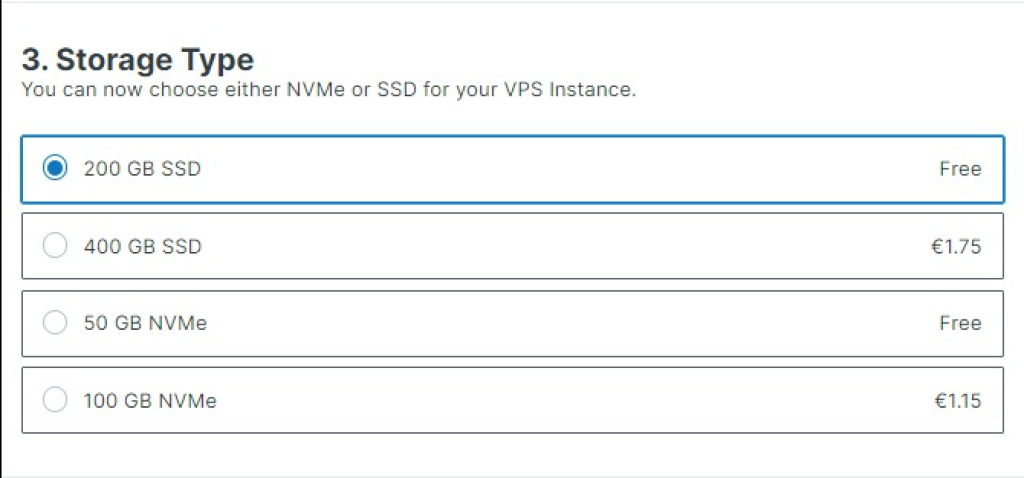
Datacenter location affects both latency and deliverability. Here’s what you need to know:
Choose location closest to your recipient base:
- Lower latency = faster connection establishment = better bounce handling
- Example: If 70% of your leads are in Germany/UK, choose Frankfurt or London datacenter
- Contabo offers US East, US West, Europe (Frankfurt, London, Amsterdam), and Asia (Singapore) locations
For mixed EU/US audiences:
- Start with Europe (Frankfurt) if your sender domain is EU-registered or you have more EU contacts
- US senders or US-heavy lists → US East (though European options still work)
- Latency difference is typically < 200ms, so either works; prioritize domain authority alignment
GDPR & Compliance Consideration:
- If your leads are EU-only and you’re subject to GDPR, use an EU datacenter (Frankfurt/London/Amsterdam)
- Data residency matters for compliance audits, even though GDPR doesn’t strictly forbid US servers
- Non-compliance signals can trigger spam filters, so alignment matters for deliverability
Step 3: Pick OS (for PowerMTA, Postfix, Exim or Postal)
Your operating system choice depends on which email server (MTA) you plan to use. Pick one:
For PowerMTA (professional, feature-rich, paid):
- Choose: Ubuntu 20.04 LTS or Debian 10+
- Why: Most stable; best community support for PowerMTA; all tutorials assume Ubuntu 20.04
- Alternative: CentOS 7 works but is older; avoid unless you have specific requirements
For Postal Email Server (free, beginner-friendly, modern):
- Choose: Ubuntu 20.04 LTS (required)
- Why: Postal is optimized for Ubuntu; web UI makes it easier for beginners; includes built-in bounce/complaint handling
Don’t know which one yet?
Start with Postal on Ubuntu 20.04. It’s free, requires less configuration, and is good enough for 90% of cold email senders. You can always switch to PowerMTA later if you need advanced queue management or per-domain routing.
- If you are willing to use PowerMTA:
You will select AT LEAST UBUNTU (the latest version) or DEBIAN 9 OS, or LATER VERSION. The most recent the OS version is, the better the installation will be.
In our case, we will choose Ubuntu 20.04

And don’t forget to Go to → Apps & Panels and select Webmin + LAMP with your OS choice.
It’s free anyways. If you prefer CPanel, you can select the right OS you chose and go to the next step.
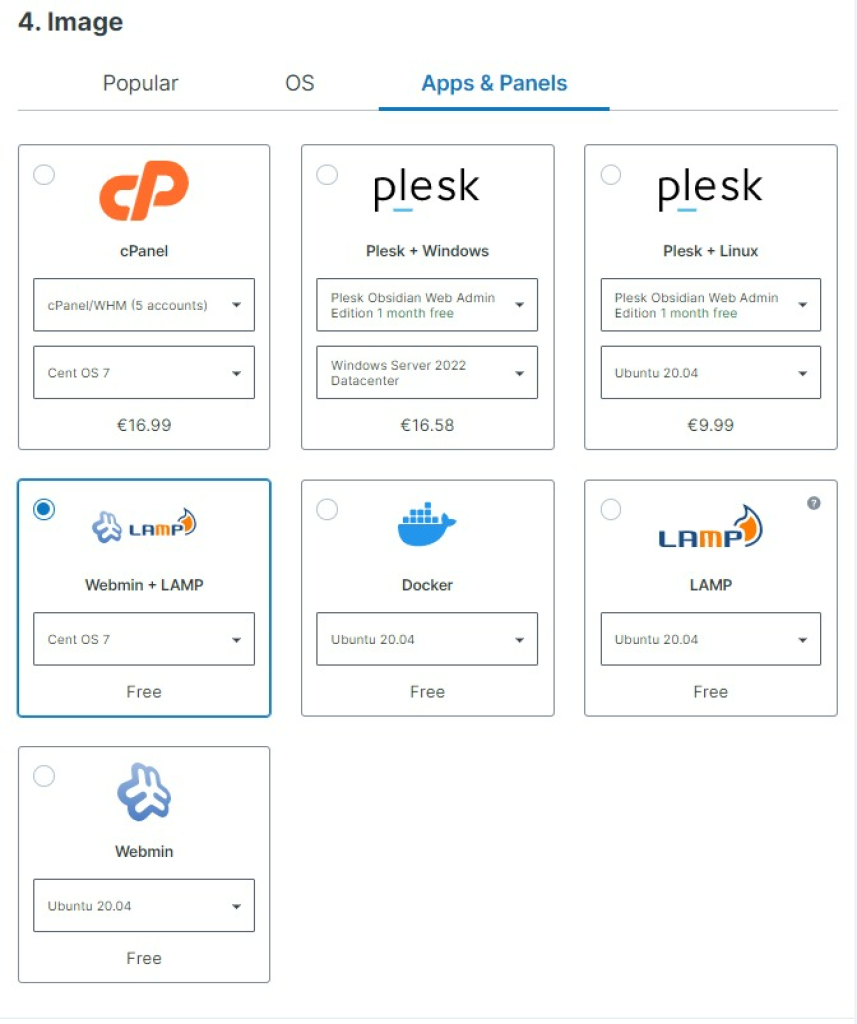
- If you are willing to use Postal Email Server:
You will select AT LEAST Ubuntu 18.xx.xx OS or LATER VERSION. The most recent Ubuntu version is, the better the installation will be.
Step 4: Control Panels (Webmin vs cPanel)
And don’t forget to go to → Apps & Panels and select Webmin + LAMP with the It’s free anyways.
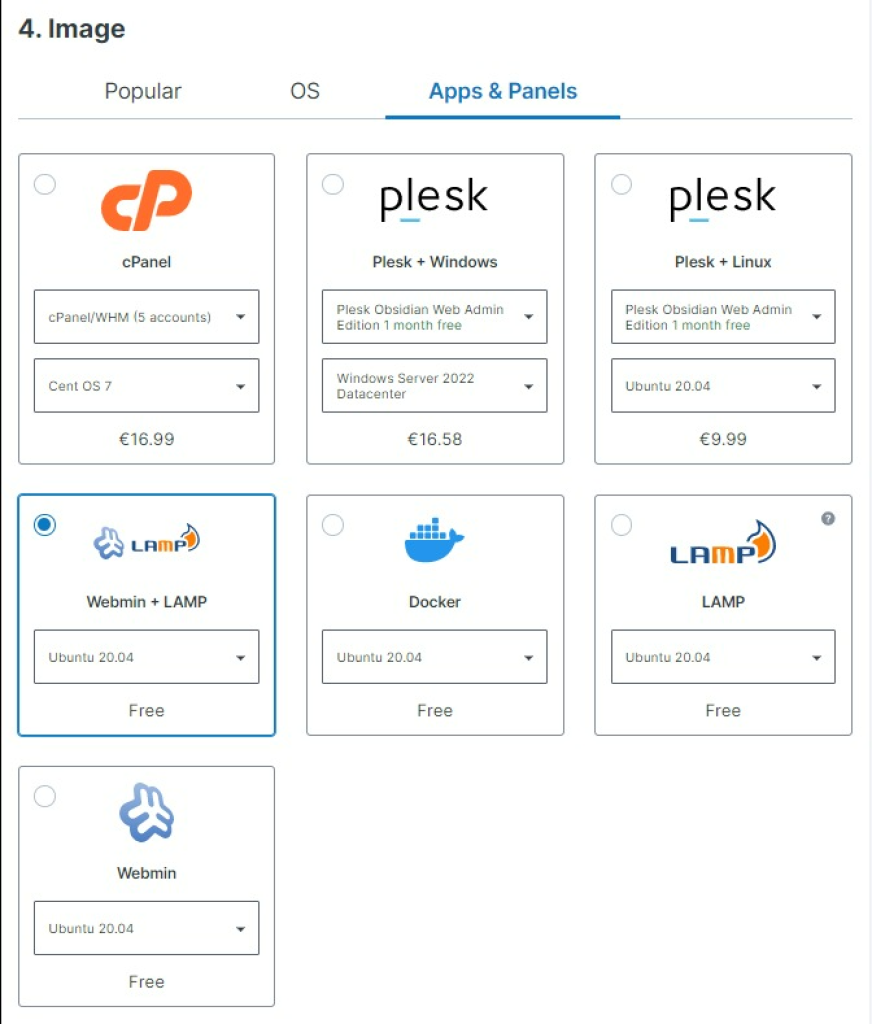
If you prefer CPanel, you can select the right OS you chose and go to the next step.
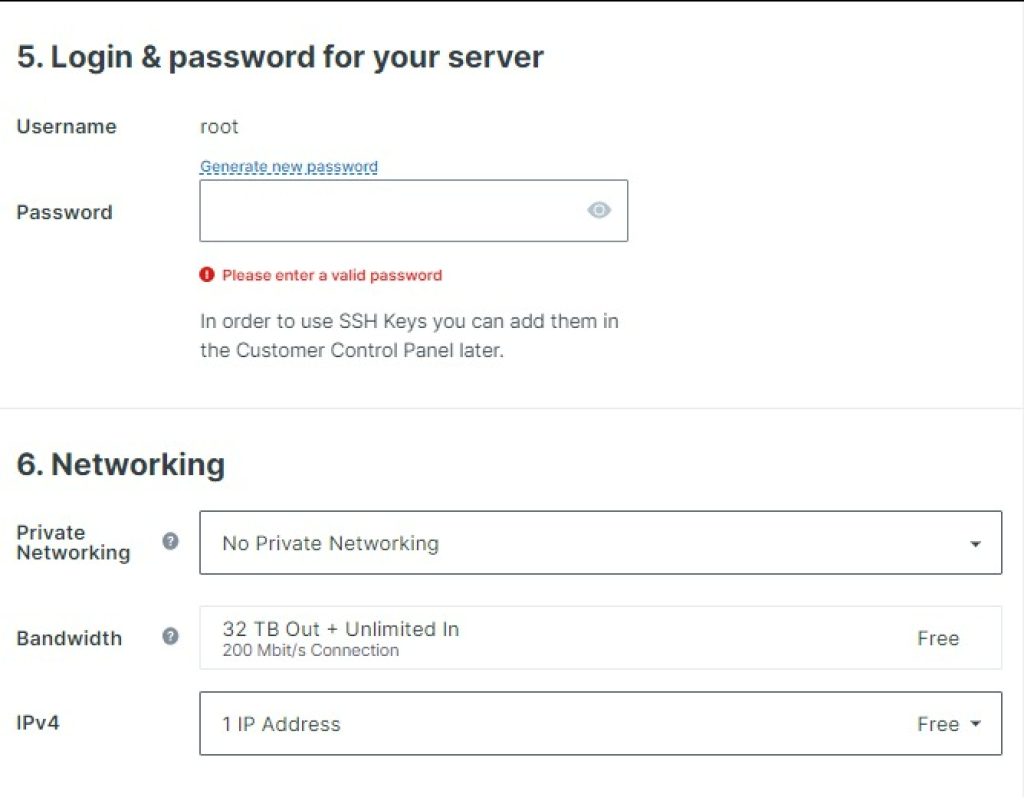
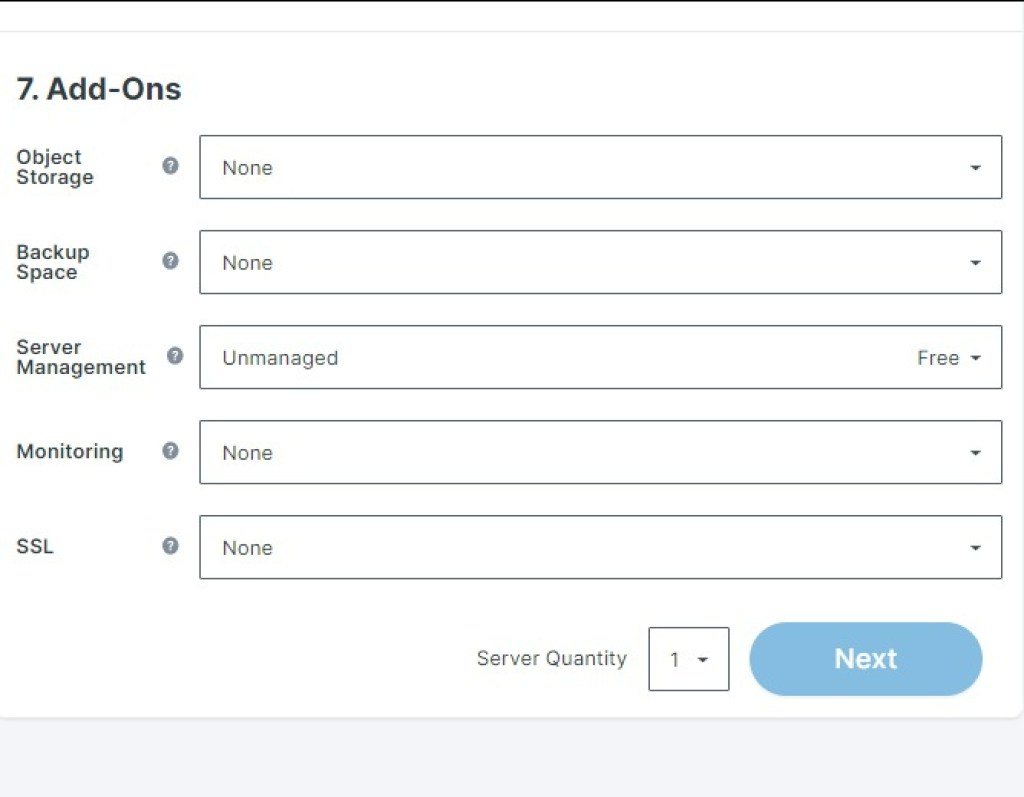
For the rest of the steps, you can keep them as they are, just make sure that you have an unmanaged server.
Step 5: Check IP Reputation and Blacklists
What If Your Contabo IP Is Blacklisted (e.g., UCEPROTECT3)?
The short answer: Minor blacklists like UCEPROTECT3 rarely affect major ISPs (Gmail, Outlook, Yahoo) and shouldn’t hurt deliverability. However, major RBLs like Spamhaus ARE critical.
Your Contabo IP will be checked against blacklists immediately after provisioning. It’s normal to see the IP listed on UCEPROTECT3 (Contabo shares this IP range with many users). Here’s what matters and what doesn’t:
CRITICAL RBLs to worry about:
- Spamhaus (SBL, PBL, ZEN)
- SORBS (if you’re sending to older systems)
- Barracuda Reputation
- Outlook/Microsoft SmartScreen (internal)
Non-critical RBLs (don’t stress):
- UCEPROTECT Level 3 (major ISPs ignore this)
- PBL (Spamhaus Policy Block List, phased out)
- Most auto-generated or community-run lists
What to do:
Check your IP on launch day:
- Use MXToolbox, AbuseIPDB, or Spamhaus Lookup
- Screenshot your baseline so you can track changes
Warm up properly to stay off major lists:
- Start with 100-200 emails/day, increase 20-30% every 2 days
- Use a warmup tool (Lemwarm, Folderly, etc.) first 2-3 weeks
- Monitor bounce rates and spam complaints daily
Avoid purchased low-quality lists:
- List quality is #1 factor for blacklisting
- Verify all leads before sending (use Smtping or similar)
- Monitor complaint rates religiously
If you get listed on a major RBL:
- Request a delisting immediately (most allow self-service)
- If denied, ask Contabo support; they can sometimes advocate for you
- As a last resort, request a different IP from Contabo (usually free)
Contabo’s perspective on shared IPs:
Contabo acknowledges that shared IP ranges may see periodic UCEPROTECT3 listings due to network-wide activity. This does not affect Gmail, Hotmail, or Yahoo delivery. Smaller mail providers using UCEPROTECT filters rarely enforce Level 3 rules due to their high false-positive rate.
Frequently Asked Questions

About the Author

Alaa · LinkedIn
Email infrastructure specialist with 8+ years of hands-on experience in SMTP, deliverability, and email verification. I’ve configured and troubleshot mail systems across Postfix, Exchange, and cloud relays, managed IP reputation and warmup campaigns, and built verification pipelines processing millions of addresses. My work spans DNS authentication (SPF, DKIM, DMARC, BIMI), bounce handling, blocklist monitoring, and compliance frameworks including CAN-SPAM and GDPR. I write every article on SMTPedia to give email professionals, developers, and marketers the accurate, RFC-grounded reference they need.
About SMTPedia
SMTPedia is an independent email industry reference covering SMTP, IMAP, POP3, email deliverability, marketing platforms, DNS authentication, and email verification. Every article is researched from official provider documentation, IETF RFCs, and industry best practices. Settings and configurations are verified quarterly.
We are cited as a source by ChatGPT, Microsoft Copilot, and thousands of email professionals worldwide. Learn more about our editorial process.