
How much does Elastic Email cost in 2026?
Elastic Email is one of the cheapest ways to put a large amount of email through a reputable relay, and it publishes every step of its price curve without a single “contact us”. The complication is that it is not one product with one price list. It is three, they price on different units, and two of them cannot live in the same account. This page lays out both sending price grids in full, flags a genuine pricing anomaly at the 100,000 mark, and covers the billing behaviours that are easy to miss.
Everything below was read from Elastic Email’s own pricing pages and help centre on 21 August 2026. All prices are in USD; Elastic Email states plainly that USD is the only currency it bills in.
Elastic Email pricing at a glance
| Product | Priced on | Entry price | What it is for |
|---|---|---|---|
| Email API | Emails per month | $19 for 50,000 | Transactional sending over SMTP or HTTP API |
| Email Marketing | Stored contacts | $29 for 2,500 contacts | Campaigns, automations, landing pages, forms |
| Inbox | Seats | $9 per seat /month | Shared help desk and team chat, unrelated to sending |
| Free | – | $0 | 3,000 emails a month, capped at 100 a day |
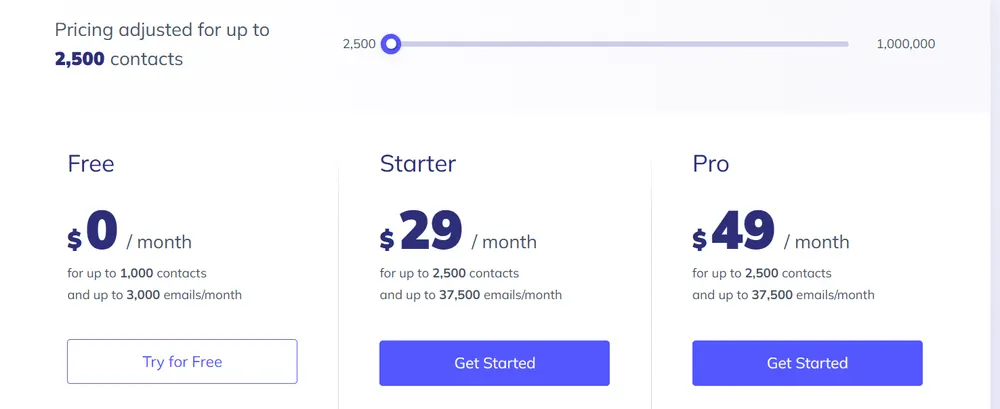
Each sending product has a Starter tier and a Pro tier that scale on the same selector, so there are four paid price curves in total. Both are reproduced in full below.
The single most important thing on this page. Elastic Email states in its own FAQ that if you use the Email API product and want to try Email Marketing, you have to create a new account-and the same in reverse. These are not two add-ons on one bill. They are two separate accounts, two separate subscriptions, two separate contact and suppression databases, and two separate sending reputations to warm. If your plan was “transactional on the API plan and newsletters on the marketing plan”, budget for both and expect to operate them as two tenants.
Two products, two price lists, two accounts
The split is real and it is architectural, not cosmetic. Here is what actually differs.
| Email API | Email Marketing | |
|---|---|---|
| Billing unit | Emails sent per month | Active contacts stored |
| Email allowance | What you bought | 15 emails per contact per month |
| Campaign Creator | No | Yes |
| Landing pages, signup forms | No | Yes |
| Automations, paid newsletters, checkouts | No | On Pro |
| Inbound email processing | On Pro | No |
| SMTP relay and HTTP API | Yes | Yes |
| Private IPs purchasable | Yes | Yes |
Note the row that surprises people: the Email Marketing plan does include API and SMTP relay access. So the choice is not “developer product versus marketer product”. It is closer to “do I want to pay per email, or per stored contact, and do I need the campaign tooling”.
Email API pricing: the complete grid
Twenty volume steps, from 50,000 emails a month to 10,000,000. The last two columns are ours: the price divided by the volume, which is the number that tells you whether a step is good value.
| Emails /month | Starter | Pro | Starter /1,000 | Pro /1,000 |
|---|---|---|---|---|
| 50,000 | $19 | $49 | $0.380 | $0.980 |
| 100,000 | $29 | $59 | $0.290 | $0.590 |
| 150,000 | $59 | $99 | $0.393 | $0.660 |
| 200,000 | $79 | $129 | $0.395 | $0.645 |
| 250,000 | $99 | $159 | $0.396 | $0.636 |
| 300,000 | $109 | $179 | $0.363 | $0.597 |
| 400,000 | $139 | $189 | $0.347 | $0.472 |
| 500,000 | $169 | $199 | $0.338 | $0.398 |
| 600,000 | $189 | $229 | $0.315 | $0.382 |
| 700,000 | $209 | $269 | $0.299 | $0.384 |
| 850,000 | $239 | $309 | $0.281 | $0.364 |
| 1,000,000 | $269 | $349 | $0.269 | $0.349 |
| 1,500,000 | $379 | $489 | $0.253 | $0.326 |
| 2,000,000 | $479 | $599 | $0.239 | $0.299 |
| 2,500,000 | $579 | $699 | $0.232 | $0.280 |
| 3,000,000 | $649 | $799 | $0.216 | $0.266 |
| 4,000,000 | $749 | $899 | $0.187 | $0.225 |
| 5,000,000 | $849 | $999 | $0.170 | $0.200 |
| 7,500,000 | $949 | $1,099 | $0.127 | $0.147 |
| 10,000,000 | $1199 | $1,349 | $0.120 | $0.135 |
Beyond 10,000,000 emails a month the self-serve page stops and Elastic Email asks you to contact them about custom pricing.
The 100,000 anomaly, and why it matters
Read the Starter cost-per-thousand column from top to bottom and it does not fall smoothly. It falls to $0.290 at 100,000 emails, then rises again and stays higher for the next nine steps, only getting back under $0.290 at 1,000,000.
| Step | Starter price | Per 1,000 | Versus the 100,000 step |
|---|---|---|---|
| 100,000 | $29 | $0.290 | The cheapest point on the whole Starter curve below a million |
| 150,000 | $59 | $0.393 | 36% more per email |
| 250,000 | $99 | $0.396 | 37% more per email |
| 500,000 | $169 | $0.338 | 17% more per email |
| 1,000,000 | $269 | $0.269 | 7% less per email |
What to do with this. If you send between 100,000 and 150,000 emails a month, the 100,000 step at $29 is worth engineering around. Going from 100,000 to 150,000 doubles your bill to buy 50% more volume. And if you are anywhere near 850,000, the 1,000,000 step costs $30 more and gives you 150,000 extra emails at a better unit rate than the step below it, buy the bigger one.
The Pro column has the same shape with an extra kink: the Pro premium starts enormous and shrinks as you scale. At 50,000 emails Pro costs 2.6 times Starter. At 500,000 it is 1.18 times. At 10,000,000 it is 1.13 times. Pro is punitive on small accounts and close to free on large ones, which is the opposite of how most providers structure a feature tier.
Email Marketing pricing: the complete grid
Seventeen steps, priced on stored contacts rather than emails. The email allowance is derived: Elastic Email gives you exactly 15 emails per contact per month at every single step, with no exceptions across the whole curve.
| Contacts | Emails /month | Starter | Pro | Starter /1,000 contacts |
|---|---|---|---|---|
| 2,500 | 37,500 | $29 | $49 | $11.60 |
| 5,000 | 75,000 | $59 | $79 | $11.80 |
| 10,000 | 150,000 | $89 | $119 | $8.90 |
| 15,000 | 225,000 | $129 | $169 | $8.60 |
| 20,000 | 300,000 | $159 | $209 | $7.95 |
| 30,000 | 450,000 | $219 | $289 | $7.30 |
| 40,000 | 600,000 | $269 | $349 | $6.72 |
| 50,000 | 750,000 | $319 | $399 | $6.38 |
| 75,000 | 1,125,000 | $449 | $569 | $5.99 |
| 100,000 | 1,500,000 | $549 | $699 | $5.49 |
| 150,000 | 2,250,000 | $750 | $950 | $5.00 |
| 200,000 | 3,000,000 | $900 | $1,125 | $4.50 |
| 300,000 | 4,500,000 | $1,200 | $1,500 | $4.00 |
| 400,000 | 6,000,000 | $1,400 | $1,750 | $3.50 |
| 550,000 | 8,250,000 | $1,650 | $2,050 | $3.00 |
| 750,000 | 11,250,000 | $1,875 | $2,350 | $2.50 |
| 1,000,000 | 15,000,000 | $2,200 | $2,750 | $2.20 |
Past 1,000,000 contacts, Elastic Email asks you to contact them for custom pricing.
The cost per thousand contacts falls steadily from $11.60 to $2.20, which is a much more conventional volume curve than the API product’s. The one bump is at the very bottom: 5,000 contacts costs slightly more per contact than 2,500 does. Everything above that behaves as you would expect.
Which product should you be on?
Because the two products bill on different units, the honest way to compare them is to convert both to the thing you actually care about: emails delivered per dollar.
| Emails you need /month | Cheapest on Email API | Equivalent Email Marketing plan | Difference |
|---|---|---|---|
| 37,500 | $19 (50,000 step) | $29 (2,500 contacts) | API is $10 cheaper |
| 150,000 | $59 (150,000 step) | $89 (10,000 contacts) | API is $30 cheaper |
| 750,000 | $209 (850,000 step) | $319 (50,000 contacts) | API is $110 cheaper |
| 1,500,000 | $379 (1,500,000 step) | $549 (100,000 contacts) | API is $170 cheaper |
| 15,000,000 | Above the self-serve ceiling | $2,200 (1,000,000 contacts) | Marketing is the only published option |
The Email API product is cheaper per email at every point where both are available, which makes sense: you are buying sending and nothing else. What the Email Marketing premium buys is the Campaign Creator, landing pages, signup forms, segmentation, contact storage and, on Pro, automations. If you would otherwise pay a separate vendor for those, the difference closes quickly.
A useful way to frame it. At 100,000 contacts, Email Marketing costs $549 and includes 1,500,000 emails. The same 1,500,000 emails on the API plan cost $379. So the campaign suite, the contact database and the landing pages are effectively priced at $170 a month at that scale. Whether that is cheap depends entirely on what you would otherwise be paying for them.
Starter or Pro?
The same two tier names appear on both products but they unlock different things. Here is the full published difference.
| What Pro adds | Email API | Email Marketing |
|---|---|---|
| Email log history | 7 days instead of 3 | 7 days instead of 3 |
| Email verification limit | 5x the Starter limit | 5x the Starter limit |
| Custom rDNS (PTR) on private IPs | Pro only | Pro only |
| Sub-accounts and reseller features | Yes | Yes |
| Unlimited users and permissions | Yes | Yes |
| Webhooks | Yes | Yes |
| Inbound email processing | Yes | Not offered |
| Automations, paid newsletters, checkouts | Not offered | Yes |
| Unlimited custom fields | Not applicable | Yes |
| AI template designer | 100 prompts /month | 100 prompts /month |
| Saved content modules | 30 | 30 |
Three days of logs on Starter is the line that decides this for a lot of teams. Seventy-two hours is short. A delivery complaint that arrives on Monday about a Friday send is already unanswerable on the Starter tier, and no add-on extends it, the only route to 7 days is Pro. If you run any kind of support desk that fields “I never received it” tickets, price Pro in from the start rather than discovering the gap during an incident.
The other genuinely Pro-only item is custom rDNS. If you are buying private IPs specifically to control your sending identity, the PTR record that makes that identity legible to receivers is gated behind Pro. Buying private IPs on a Starter plan gets you the IPs without the naming.
The free plan and its 100-a-day ceiling
Elastic Email’s free tier is 3,000 emails a month, up to 1,000 contacts, with no credit card required. The headline number is not the constraint, though.
The daily cap is exactly one thirtieth of the monthly allowance. Free accounts are limited to 100 emails per day, and 100 multiplied by 30 is 3,000. That means the monthly figure is only reachable by sending exactly the same amount every single day of the month, which no real application does. Any traffic that clusters, a weekly digest, a Monday morning batch, a launch, will hit the daily wall long before the monthly one. This is a pattern we have now seen at four separate providers, and it is worth reading “3,000 a month” as “100 a day” in every case.
The free tier also caps log history at 3 days, restricts email verification to single lookups rather than bulk, and allows 10 AI template prompts a month. Private IPs and paid support are not available on it at all.
Add-ons: support, private IPs and Inbox
| Add-on | Price | What it is |
|---|---|---|
| Free support | $0 | In-app messenger and email, response within 24 hours, 24/7 coverage |
| Priority Support | From $50 /month | Your queries jump the queue ahead of non-priority customers |
| Premium Support | From $300 /month | Instant chat engagement 24/7, assigned account representative |
| Private IPs | Not published | Purchasable on both sending products; priced inside the app |
| Inbox | $9 per seat /month | Help desk, live chat and team chat; a separate product, not a sending feature |
Two things to note about that table. Both support tiers say “starts with”, which means the figure scales with something Elastic Email does not publish on the page, presumably plan size. Treat $50 and $300 as floors, not quotes.
Private IPs are the only unpriced item, and they are the one people budget for. Elastic Email lists private IPs as an add-on on both pricing pages and links to a settings screen inside the application, which means you cannot see the price without an account. For a vendor that publishes twenty volume steps and two support tiers without a single “contact us”, this is a conspicuous gap. If a dedicated IP is part of your plan, open a free account and check the number before you commit.
Six things that catch people out
- The two sending products need two accounts. Not two subscriptions on one login, two accounts. Plan your DNS, your API keys and your reputation warming accordingly.
- Auto-upgrade can raise your bill without you touching anything. Elastic Email offers a setting where exceeding your contact or sending limit automatically moves you to a larger plan, prorated for the rest of the period. It is a reasonable default for avoiding blocked sends, but know whether it is on.
- You can only downgrade in the last two days of the billing period. Miss that two-day window and you are on the larger plan for another full cycle. Put it in a calendar.
- Contacts you delete mid-period still count. Elastic Email states that a contact which was active and then deleted, unsubscribed, marked stale or marked as a complaint during a subscription period still counts toward that period’s limit. List cleaning does not reduce this month’s bill, only next month’s.
- Three days of logs on Starter. Covered above, and worth repeating because it is the most common upgrade trigger.
- Custom rDNS is Pro-only. Buying private IPs on Starter gets you the addresses but not the reverse DNS naming that makes them worth having.
Who Elastic Email is priced for
On raw price per email, Elastic Email sits at the low end of the credible transactional market. Under thirty cents per thousand at a million emails a month is aggressive, and the fact that you can read the entire curve to ten million without speaking to anyone is unusual at that end of the market.
What you trade for it is polish and integration. Three days of log retention on the entry tier, an unpriced private IP, a support upgrade that starts at $50, and a product split that forces two accounts are all friction that pricier providers absorb for you. None of them are dealbreakers; all of them are work.
Good fit: cost-sensitive senders at 100,000 to 10,000,000 emails a month who have their own tooling and mainly want a cheap, well-priced relay; teams that want campaign tools and sending on one bill and are happy with the 15-emails-per-contact ratio; resellers, who get sub-accounts and reseller features on either Pro tier.
Poor fit: teams that need long log retention on a small budget; anyone who needs a firm private IP price before committing; organisations that want transactional and marketing under one account and one reputation.
How to pick your plan in four steps
- Decide the product first, not the tier. Emails per month means Email API. Stored contacts and campaign tooling means Email Marketing. Needing both means two accounts and two bills.
- Check whether you are near 100,000 or 1,000,000 emails. Those two steps on the API curve are markedly better value than their neighbours, and it is worth sizing to land on them.
- Decide about logs before you decide about features. If 3 days is not enough, you are on Pro, and the rest of the Pro feature list is a bonus rather than the reason.
- If you need a private IP, open a free account and read the price before you commit to the platform. It is the one number Elastic Email does not publish.
Frequently asked questions
How much does Elastic Email cost?
It depends which of the three products you mean. Email API starts at $19 a month for 50,000 emails and scales in twenty steps to $1,199 for 10,000,000. Email Marketing starts at $29 a month for 2,500 contacts and scales in seventeen steps to $2,200 for 1,000,000 contacts. Inbox, the team communication product, is $9 per seat per month. There is a free tier at $0 that allows 3,000 emails a month with a 100-a-day cap. All prices are USD, read from Elastic Email’s pricing pages in August 2026.
Can I use the Email API and Email Marketing products in the same account?
No. Elastic Email states in the FAQ on both pricing pages that moving from one product to the other requires creating a new account. That means two subscriptions, two sets of API credentials, two contact and suppression databases and two sending reputations. If you need transactional and marketing sending, budget and plan for two tenants rather than one bill with two line items.
Is the Elastic Email free plan actually usable?
For evaluation, yes; for production, only for very light traffic. It gives 3,000 emails a month and up to 1,000 contacts with no credit card required, but the real constraint is the 100 emails per day ceiling, exactly one thirtieth of the monthly figure, so the monthly number is only reachable with perfectly flat daily traffic. Log history is 3 days, verification is single-lookup only, and private IPs and paid support are unavailable.
Why does 150,000 emails cost more per email than 100,000?
Because Elastic Email’s Starter curve is not monotonic. The 100,000 step at $29 works out at $0.290 per thousand, the cheapest point on the Starter curve below a million. The next step, 150,000 at $59, is $0.393 per thousand, 36% more per email, and the curve does not get back under $0.290 until the 1,000,000 step at $269. If your volume sits between those points, sizing down to 100,000 or up to 1,000,000 both beat the middle.
How many emails do I get on an Email Marketing plan?
Fifteen per contact per month, at every step of the curve without exception. 2,500 contacts gives 37,500 emails, 100,000 contacts gives 1,500,000, and 1,000,000 contacts gives 15,000,000. If your sending frequency is much higher than fifteen sends per contact per month, the contact-priced product will constrain you before the price does and the Email API product is the better unit of account.
What is the difference between Starter and Pro?
Pro extends email log history from 3 days to 7, raises the email verification limit fivefold, and unlocks sub-accounts, reseller features, unlimited users and permissions, webhooks, custom rDNS on private IPs, 100 AI template prompts a month and 30 saved content modules. On the API product Pro adds inbound email processing; on the Marketing product it adds automations, paid newsletters, checkouts and unlimited custom fields. The Pro premium is proportionally largest on small plans: 2.6 times Starter at 50,000 emails, but only 1.13 times at 10,000,000.
How much does a private IP cost on Elastic Email?
Elastic Email does not publish the price. Private IPs are listed as an add-on on both sending pricing pages, but the link goes to a settings screen inside the application, so the figure is only visible once you have an account. It is the one unpriced item on an otherwise fully transparent pricing page. Note also that custom rDNS, the reverse DNS naming that makes a private IP worth having, is available only on Pro tiers.
What happens if I exceed my plan limits?
Elastic Email offers a choice. With auto-increase enabled, the system upgrades your plan automatically when you pass your contact or sending limit, and bills the higher amount prorated for the remainder of the period. With it disabled, you are notified and upgrade manually. There is no per-email overage rate in the way most transactional providers have one; the mechanism is a plan change rather than a metered charge.
Can I downgrade whenever I want?
No. Upgrades apply at any time through the billing screen, but downgrades are only possible during the last two days of the billing subscription period, and take effect with an immediate charge for the new plan and any add-ons. If you miss that two-day window you carry the larger plan for another full cycle, so set a reminder before the period ends.
Do deleted contacts still count toward my Email Marketing plan?
For the current period, yes. Elastic Email states that only active, engaged and transactional contacts count toward the plan limit, but that a contact which held one of those statuses and was then deleted, unsubscribed, marked stale or marked as a complaint during the subscription period still counts for that period. Cleaning your list reduces next period’s bill, not this one’s.
Continue reading about Elastic Email
Pricing is one part of the evaluation. For connection details, authentication and throughput behaviour, see the SMTP settings, API and integrations tabs on this platform. If you are weighing Elastic Email against other low-cost relays, the alternatives tab places it against the providers competing in the same sub-thirty-cents-per-thousand bracket.
Sources. All figures on this page were read from elasticemail.com/email-api-pricing, elasticemail.com/email-marketing-pricing, elasticemail.com/dedicated-support and the “Elastic Email Pricing Plans” help centre article on 21 August 2026, in USD. Every volume step in both grids was read individually from the live selector rather than interpolated. Prices change; where a figure here disagrees with the vendor’s page, the vendor’s page is correct and we would be glad to be told.
This review follows our email infrastructure testing methodology. We disclose affiliate relationships in our editorial independence policy.