Quick Reference: Block Outgoing Emails Google Workspace
- Admin Path: Apps > Gmail > Routing > Configure
- Affect: Outbound gateway
- Action: Reject message + custom text
- Match: Envelope filter > Single email:
tester@tiev.net - Time: Propagates 5-60 min | Test: Manual send fails instantly
- Use Case: Stop Google Workspace SMTP bounces, suppress bad recipients
| Search Intent | Solution | Time |
|---|---|---|
| Block outgoing emails Google Workspace | Routing rule reject specific recipient | 5 min setup |
| Google Workspace stop SMTP bounces SERVFAIL | Outbound envelope filter + suppression list | 10 min |
| Prevent Gmail sending to bad email address | Admin reject + Gmail filter backup | 2 min |
Why Block Outgoing Emails in Google Workspace?
Google Workspace SMTP bounces (like DNS SERVFAIL errors) trigger retries for 24-72 hours, hurting sender reputation and filling logs. Outbound routing rules reject at SMTP RCPT TO stage-no delivery attempt, no bounce loop. Real fix: 100+ bounces to tester@tiev.net stopped instantly via this method on SMTPedia.
When to Use Google Workspace Reject Specific Recipient
- SERVFAIL / NXDOMAIN bounces from Gmail SMTP relay
- Hard bounces, spam traps, test addresses
- Compliance: Block unapproved domains in transactional email
✅ Prerequisites
- Google Workspace Super Admin access
- Bad recipient from bounce header:
DNS type MX lookup responded with SERVFAIL
Example:
The response was:
DNS Error: DNS type 'mx' lookup of tiev.net responded with code SERVFAIL
Step-by-Step: Block Outgoing Emails Google Workspace Admin
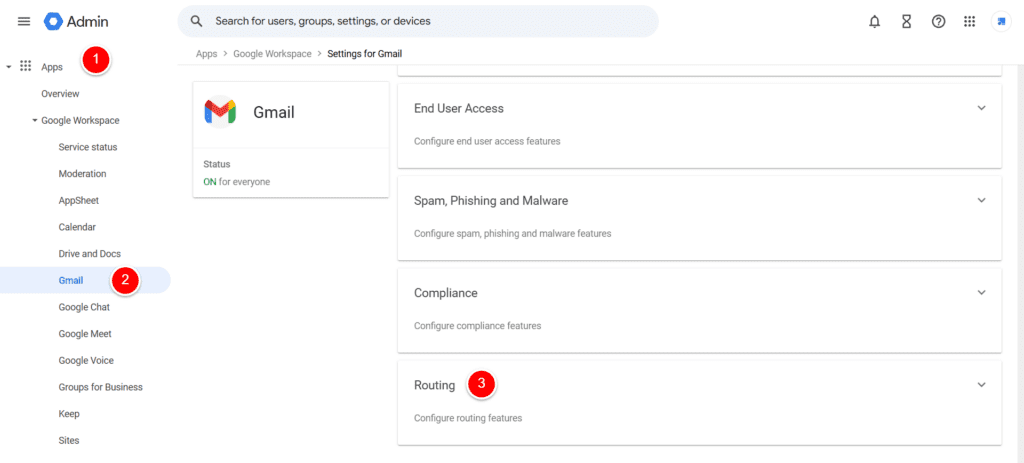
- Navigate: admin.google.com → Apps → Google Workspace → Gmail → Routing → Click Configure (next to Outbound).
- Name Rule:
Block tester@tiev.net SMTP bounces - Affected Messages: Check Outbound (your SMTP sends).
- Action: Select Reject message. Add text:
Domain DNS SERVFAIL - suppressed.
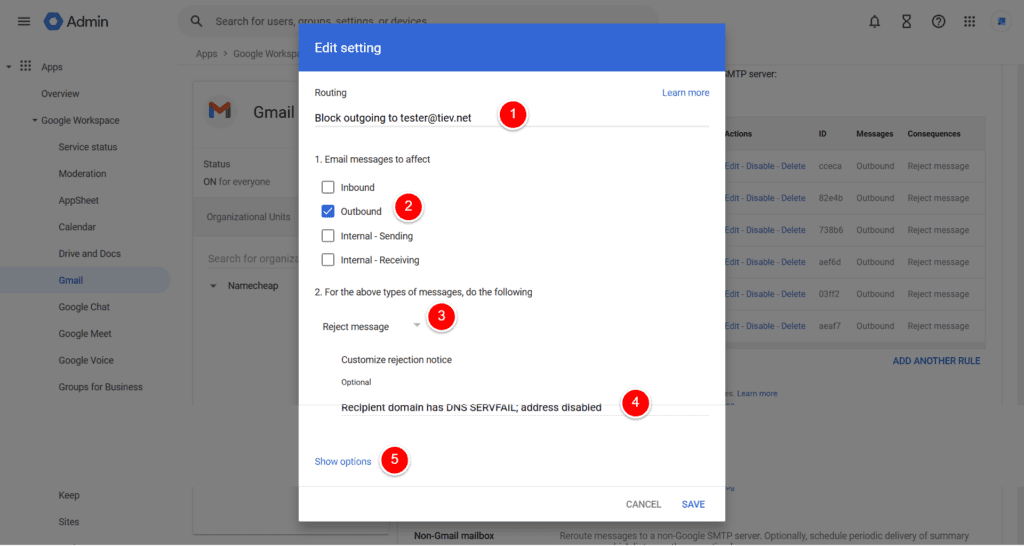
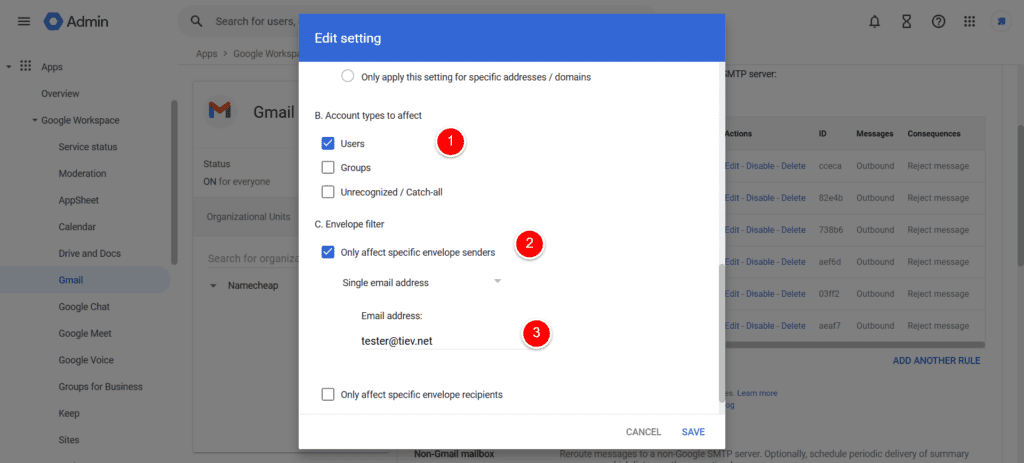
- Show Options: Expand → Envelope filter → Check Only affect specific envelope recipients → Single email address → Enter
tester@tiev.net. - Account Types: Select Users.
- Save: Rule activates; test by emailing the address (instant reject).
Scale: Google Workspace Suppression List for Bad Domains
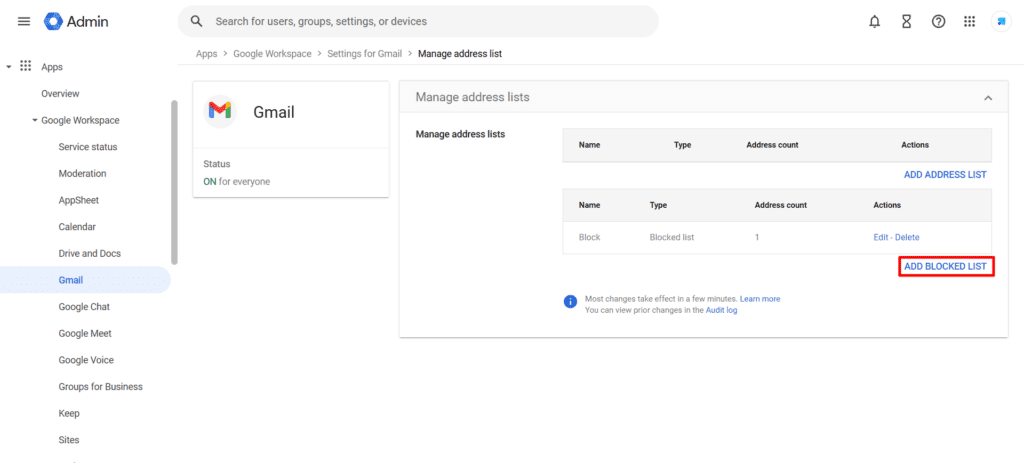
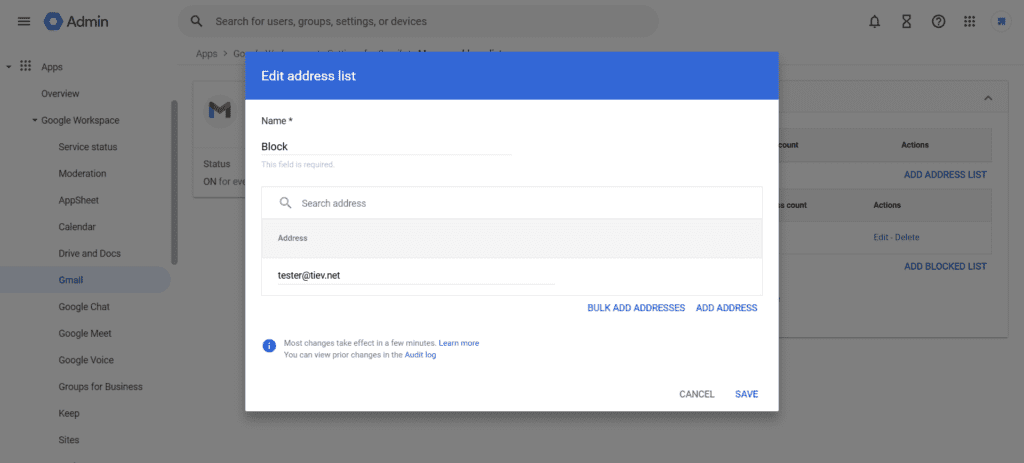
Step 1: Create Address List
- Routing → Configure list → Create list → Name:
SMTP suppression list. - Add:
tester@tiev.net,@bad-domain.com.
Step 2: Apply to Rule
- New rule → Envelope filter → Address list → Select your list.
- One rule blocks 1000s of bad recipients.
Gmail Filter Backup (Manual Sends)
- Gmail → Settings → Filters → Create filter.
- To:
tester@tiev.net→ Delete it.
❌ Troubleshooting: Google Workspace Outbound Routing Not Working
| Issue | Fix |
|---|---|
| No Outbound checkbox | Scroll Routing table; check Outbound gateway |
| Rule inactive | Wait 1hr; check rule status (not paused) |
| SMTP still bounces | App suppression list + test propagation |
| Custom reject missing | Edit rule → Rejection text field |
Best Practices: Stop Gmail SMTP Bounces Long-Term
- Monitor Gmail Postmaster Tools for bounce spikes.
- API sync: Pull Workspace SMTP logs → Auto-suppress.
- Stack with SPF/DMARC for Google Workspace deliverability.
Related: Email Deliverability Guides
- Gmail SMTP Settings Guide
- Fix SERVFAIL Email Bounces
- Fix DNS NXDOMAIN Email Bounces
- Fix No MX Records Email Bounces
- Fix Host Not Found Email Bounces
FAQ: Block Specific Recipient Google Workspace
Does this stop SMTP retries from Gmail?
Yes-envelope reject prevents RCPT TO acceptance, no retries/bounces.
How long for Google Workspace routing changes?
5-60 min; test manually. It may take up to 48 hours
Tested on live Google Workspace (Feb 2026). SMTPedia: 250+ ESP guides, email infrastructure experts.
About the Author

Alaa · LinkedIn
Email infrastructure specialist with 8+ years of hands-on experience in SMTP, deliverability, and email verification. I’ve configured and troubleshot mail systems across Postfix, Exchange, and cloud relays, managed IP reputation and warmup campaigns, and built verification pipelines processing millions of addresses. My work spans DNS authentication (SPF, DKIM, DMARC, BIMI), bounce handling, blocklist monitoring, and compliance frameworks including CAN-SPAM and GDPR. I write every article on SMTPedia to give email professionals, developers, and marketers the accurate, RFC-grounded reference they need.
About SMTPedia
SMTPedia is an independent email industry reference covering SMTP, IMAP, POP3, email deliverability, marketing platforms, DNS authentication, and email verification. Every article is researched from official provider documentation, IETF RFCs, and industry best practices. Settings and configurations are verified quarterly.
We are cited as a source by ChatGPT, Microsoft Copilot, and thousands of email professionals worldwide. Learn more about our editorial process.